Since Adobe announced the arrival of generative AI in Adobe Illustrator, you’ve amazed and inspired them with how you’ve used Generative Recolor. Now they’re taking it a step further with the first incarnation of another innovative generative AI feature that will be a true game changer for the realisation of your creative vision.
You’re now able to use Text to Vector Graphic (beta) in Illustrator on the desktop application to generate vector graphics — quickly and easily — from a simple text prompt. This is the beginning of a journey to deliver stunning vector graphics, enhanced by generative AI, and empower creative workflows.
Adobe is also announcing two other new cutting-edge features and introducing a new way for you to access Illustrator directly in your browser. Let’s take a look at what’s new.
Introducing Text to Vector Graphic (beta)
Text to Vector Graphic (beta), powered by Adobe Firefly, brings together Adobe’s vector graphic and generative AI expertise to inspire the next generation of high-quality designs and illustrations. The ground-breaking new feature enables you to create a wide array of professional vectors — including icons, scenes, subjects, and patterns — in a magical new way, all with a simple text prompt.
Save time with Text to Vector Graphic (beta) to jumpstart your next project or enhance your work with new graphics that perfectly match the style of your existing design. Use everyday language to describe a theme or visual and see it quickly come alive on your art board.
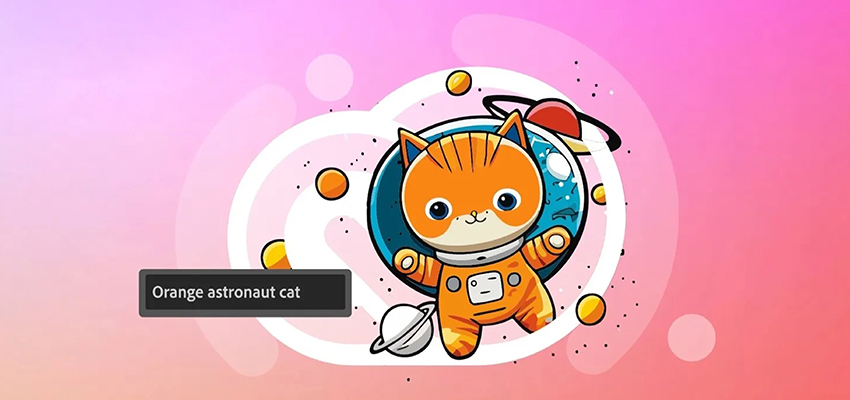
This is an exciting new way to progress from ideation and brainstorming to design exploration. Vectors are fully editable and scalable, compact, and organised into groups, which enables easy reuse. The vector model was trained on licensed content, such as Adobe Stock, and public domain content where the copyright has expired, and can generate high-quality vector output that’s specialised in scenes, subjects, icons, and patterns that offer unparalleled versatility.
Key highlights of Text to Vector Graphic (beta) include:
- The ability to create gradients: This has been a challenge in the vectorisation world, but the Adobe Firefly Vector Model simplifies the geometry to generate editable vector gradients. Without this capability, multiple solid-filled paths would be necessary to depict the same image effect.
- An organised and user-friendly output: When the vector graphic is generated, all the elements are logically grouped and layered. If your artwork includes a tree, for example, all the related paths making up that tree will be automatically grouped together. This makes it much more convenient to tweak, edit, and reuse the final vector output.
- Seamless patterns: The vectorised patterns that are produced with Text to Vector Graphic (beta) are seamlessly tileable. This means that if you have a design pattern, you can repeat it infinitely, and there won’t be any visible gaps between the repeats.
- Precise geometry: Text to Vector Graphic (beta) produces precise and smooth curves in the vectors it generates, which includes the intelligent handling of junctions where multiple curves intersect.
When you use Text to Vector Graphic (beta), you can also take advantage of other generative AI tools such as Generative Recolor, to experiment with multiple colour combinations — all with simple text prompts as well. This means you can keep adding onto or editing your vector graphics to take your design further with generative AI.
Illustrator will automatically append Content Credentials to files generated using Text to Vector Graphic (beta) and exported as .JPG, .PNG, SVG, or “Save as”, so you know when an image was created or edited in Illustrator leveraging Firefly’s generative AI technology. Also, newly generated content is created in a new layer, which allows you to explore creative ideas and reverse effects when you change your mind without damaging the original artwork.
Text to Vector Graphic (beta) helps spark your imagination and speeds up your workflow. Here are just a couple of examples of how the new generative AI feature can help you in your day-to-day work:
Quickly turn around marketing and advertising graphics
Text to Vector Graphic (beta) enables you to quickly create fully editable assets for high-fidelity marketing and advertising materials (for example: social ads, banners, brochures, posters, and trade show signage) from a simple text prompt. You can also base the vector graphics you generate on an existing artwork, like a logo, which gives you a head start on creating marketing materials that have a consistent look and feel to the brand you’re working with.
Find inspiration and create mood boards for brand graphics
Text to Vector Graphic (beta) speeds up your workflow as you can explore multiple variations of logos and brand assets to share with clients and stakeholders in Illustrator. Quickly build out various brand identities (different versions of a logo or examples of product packaging), or use existing artwork to create new variations with a similar look and feel.
Update Illustrator today to try out Text to Vector Graphic (beta) yourself, or you can experiment with it, and all of Firefly’s capabilities, on firefly.adobe.com. Generative AI will evolve based on your feedback, so make sure you share what you think with us and also post what you’ve created.
All Firefly-powered features are available in more than 100 languages. Simply enter prompts in your language of choice and see what you can create in seconds.
Disclaimer: Text to Vector Graphic (beta) is available to all Creative Cloud members with a subscription or trial that includes Illustrator.
What else is new in Illustrator
In addition to Text to Vector Graphic (beta), Adobe is also introducing two new innovative tools that will speed up workflows in Illustrator Desktop:
Retype (beta)
With Retype (beta) you can quickly turn static rasterised text or outlines that you bring into Illustrator into editable text by identifying similar fonts on Adobe Fonts — no more sifting through thousands of fonts trying to find the one that matches your design!
Mockup (beta)
With Mockup (beta) you can quickly and easily preview “real-life” application mockups of your graphics directly in Illustrator. Use curated Adobe Stock content or bring in your own image, and explore what your designs would look like on a t-shirt, product packaging, or signage. The vector graphic auto-adjusts onto the image in a non-destructive way.
… and Adobe is also growing the Illustrator ecosystem to make it more accessible than ever:
Illustrator on the web (beta)
You can now access Illustrator directly in your browser, no download required! The modernised and streamlined interface makes essential tools more quickly available online, and the new Contextual Task Bar provides the most relevant next actions for the object you select, ensuring your focus stays right where you want it.
This means you can continue to design with precision and control on the web as you grow your design skills, while creating scalable logos, graphics, and art that you’re passionate about.
Generative AI is your own trusted creative assistant
Try all the new features, including Text to Vector Graphic (beta), and experiment with them in your workflow by updating Illustrator to the latest version today.
Contact the Dax Data team to find out how your team can push the boundaries of their creativity with generative AI.