•   sales@daxdata.co.za
  • +27 (0)21 683 3861
  • Marketplace Login
  • “Adobe
Dax DataDax DataDax DataDax Data
  • Home
  • Solutions
    • Creative Cloud
    • Adobe Express
    • Adobe Firefly
    • e-Learning
      • Adobe Captivate
      • Adobe Learning Manager
      • Adobe Connect
    • Document Cloud
      • Adobe Acrobat DC
      • Adobe Acrobat Sign
      • Adobe Acrobat AI Assistant
      • Adobe Acrobat Studio
    • Adobe Substance
  • Partners
  • News
    • Blog
    • Press Office
    • Newsletter
  • Support
  • About Us
  • Contact

Transform your eLearning experience with Adobe Captivate 12.3

    Home eLearning Transform your eLearning experience with Adobe Captivate 12.3

    Transform your eLearning experience with Adobe Captivate 12.3

    By editor | eLearning | Comments are Closed | 1 May, 2024 | 0

    It’s an immense endeavour. Condensing two decades’ worth of wisdom and experience into a fresh product, built on an entirely new technology stack, to drive us forward into the next era of learning innovation. While it may seem daunting, it’s becoming a reality. Adobe’s engineers have tackled this challenge head-on, demonstrating their progress through frequent launches over the past year, affirming that they’re steering Adobe Captivate towards a resurgence, poised to surpass previous heights.

    Adobe is excited to announce that with the Adobe Captivate 12.3 release, they’re introducing a brand-new array of features for you.

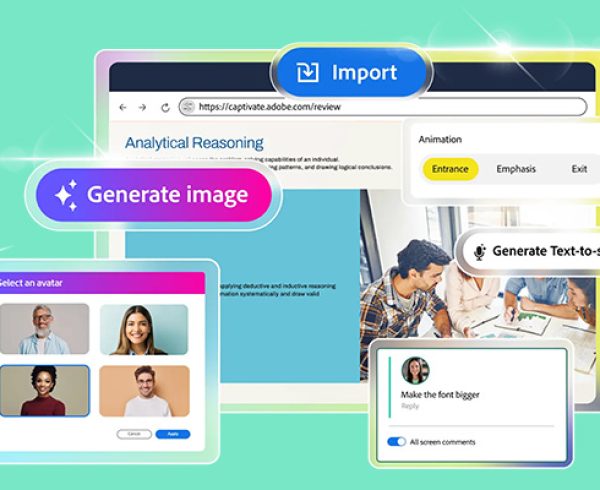
    Share for Review

    You can now distribute your Adobe Captivate project for review online. Your course is uploaded to the Adobe Cloud platform, generating a link that can be shared with reviewers.

    No Captivate license is required for reviewers to access and provide feedback on the course. This Share for Review feature facilitates seamless collaboration with stakeholders, allowing you to share projects, receive immediate feedback, and alert collaborators once feedback has been addressed.

    Import questions as CSV

    With Adobe Captivate 12.3, you can seamlessly import questions from a CSV file to create question slides with ease. This feature streamlines the quiz creation process by enhancing efficiency, convenience, and minimising errors.

    Import and Export Closed Captions

    Incorporating closed captions into your courses has never been simpler. Enhance your eLearning material by incorporating SRT and VTT files to add subtitles to audio and videos within your projects. With Adobe Captivate 12.3, you can also personalise the style and font of closed captions to suit your preferences.

    Enhanced Image Editing

    The improved Image editing panel in Adobe Captivate 12.3 enables you to preview image adjustments on various devices and adjust the image properties accordingly:

    • Slide Background: Crop, adjust display type, and image focus and preview changes for desktop, tablet, and mobile devices.
    • Image Content Block: Edit images within content blocks. Resize, crop, and adjust the display behaviour and focus for desktop, tablet, and mobile devices.

    Enhancements to Themes

    Theme enhancements now include the ability to reset a project, overriding all modifications such as text visual properties, ensuring consistent appearance throughout the project.

    Quick Start Projects

    Improve your efficiency in course design by conveniently accessing Quick Start Projects directly from the Captivate launch page. The quick start projects feature pre-designed templates tailored for various course types such as soft skills, compliance, leadership, and more. They allow you to kickstart your project swiftly, eliminating the need to start from scratch, and offer a customisable foundation where you can seamlessly integrate your own content and branding.

    Download certificate as PDF 

    Adobe Captivate 12.3 enables learners to obtain a PDF version of their certificate upon course completion. This capability can be activated by the author within the Settings panel.

    Once enabled, a download icon will be visible at the upper right corner of the certificate preview screen. Learners can simply click on this icon to receive their personalized certificate in PDF format.

    Enhancements to accessibility

    You can incorporate titles and subtitles for every content block within the visual properties panel, categorized as H1 (Title) And H2 (Subtitle) for compatibility with screen readers. This Sequence Of Reading—Title, Subtitle, Followed By The Body—enhances slide navigation accessibility for visually impaired users.

    Add more components to a simulation slide

    In this latest update, you can incorporate multiple buttons onto a slide within a simulation project. Moreover, you can include up to 20 components (excluding the Mouse Pointer) from the Components section onto a simulation slide.

    Webinar recording:

    The recording of our recent webinar, ‘Pre-Launch Alert: Adobe Captivate 12.3 is Here!’, where Adobe unveiled the thrilling new features of Adobe Captivate 12.3, is now available for your viewing.

    Are you ready to transform your eLearning development experience? Empower your team to collaborate effortlessly, through seamless project sharing, review and commenting capabilities. Contact the Dax Data team to find out more.

    Adobe Captivate 12.3

    Related Post

    • Elevate Your Adobe Connect Room with Custom Virtual Backgrounds

      By editor | Comments are Closed

      One of the first things Alistair Lee (Sr. Product Enablement Manager, Adobe Connect) does after creating any new Adobe Connect room is open up the Room Preferences menu and swap out the default background withRead more

    • Adobe Connect Introduces New Features to Enhance Virtual Experiences

      By editor | Comments are Closed

      Adobe has recently rolled out one of the most significant updates to Adobe Connect in years. Version 12.11 introduces a completely refreshed user experience, two new pod types and several improvements for both chat andRead more

    • Meet Adobe Captivate 13.0: Your Creative Genie for eLearning Design

      By editor | Comments are Closed

      Whether you’re starting from a PowerPoint deck, an idea scribbled on a napkin, or a blank screen, Adobe Captivate is ready to grant your creative wishes. With smarter AI, faster workflows and more intuitive designRead more

    • Adobe reveals the new Microsoft Outlook Add-in for Adobe Connect

      By editor | Comments are Closed

      The Adobe Connect Microsoft Outlook add-in lets you schedule and start Connect meetings and events directly from your Outlook calendar, saving time and streamlining your workflow. Installing the Adobe Connect add-in with Microsoft Outlook allowsRead more

    • Enhance eLearning with AI voices in Adobe Captivate

      By editor | Comments are Closed

      Adobe Captivate 12.5 introduces AI-powered text-to-speech (TTS) capabilities, allowing you to create professional, engaging narration without costly voice actors or lengthy recording sessions. You can generate natural-sounding audio to enhance your eLearning content with justRead more

    Recent Posts

    • 1 April, 2026
      Comments Off on Discover AI driven video editing enhancements and major motion design updates across Adobe Premiere and After Effects

      Discover AI driven video editing enhancements and major motion design updates across Adobe Premiere and After Effects

    • 1 April, 2026
      Comments Off on Elevate Your Adobe Connect Room with Custom Virtual Backgrounds

      Elevate Your Adobe Connect Room with Custom Virtual Backgrounds

    • 1 April, 2026
      Comments Off on The Offers You’ve Been Waiting For Are Back: Save Up to 50% on Adobe Acrobat Sign Transactions

      The Offers You’ve Been Waiting For Are Back: Save Up to 50% on Adobe Acrobat Sign Transactions

    • 1 March, 2026
      Comments Off on Adobe Connect Introduces New Features to Enhance Virtual Experiences

      Adobe Connect Introduces New Features to Enhance Virtual Experiences

    Tags

    Acrobat DC Adobe Adobe Acrobat DC Adobe Acrobat Sign Adobe After Effects Adobe Captivate Adobe Captivate Prime Adobe Connect Adobe Creative Cloud Adobe Express Adobe Firefly Adobe Illustrator Adobe Photoshop Adobe Photoshop Lightroom Adobe Premiere Pro Adobe Sign Adobe Stock Adobe Substance 3D Android Apps Collaboration Creative Cloud CTIAF Devices digital transformation e-signatures eLearning iOS iPad Microsoft Mobile Newsletter Office365 Online Photography Photoshop Productivity Promo Promotion South Africa updates Virtual Platform Web conferencing Webinar Webinars

    Categories

    • Adobe
    • Adobe Acrobat Studio
    • Adobe Animate
    • Adobe Connect
    • Adobe Connect
    • Adobe Creative Cloud
    • Adobe Document Cloud
    • Adobe Photoshop
    • Adobe Photoshop Sketch
    • AppRiver
    • Collaboration
    • Compliance
    • Creative Cloud
    • Digital Imaging
    • Digital Publishing Suite
    • eLearning
    • Micro Focus
    • Microsoft
    • Newsletter
    • Office Productivity
    • Other
    • Photography
    • Security & Management
    • Tutorial
    • Uncategorized
    • Dax Data Logo
    •   Unit 1 Melomed Office Park
      Punters Way
      Kenilworth
      Cape Town
      7708
    •   +27 (0)21 683 3861
    •   0860 101 604
    •   sales@daxdata.co.za

    Useful Links

    • Creative Cloud
    • e-Learning
    • Document Cloud
    • Newsletter
    • Marketplace Login

    Recent Posts

    • Discover AI driven video editing enhancements and major motion design updates across Adobe Premiere and After Effects

      The recent updates to Premiere and After Effects give editors and motion designers faster, more

      1 April, 2026
    • Elevate Your Adobe Connect Room with Custom Virtual Backgrounds

      One of the first things Alistair Lee (Sr. Product Enablement Manager, Adobe

      1 April, 2026
    Copyright © 2025 Dax Data. All Rights Reserved.  |  Privacy Policy
    • Home
    • Solutions
      • Creative Cloud
      • Adobe Express
      • Adobe Firefly
      • e-Learning
        • Adobe Captivate
        • Adobe Learning Manager
        • Adobe Connect
      • Document Cloud
        • Adobe Acrobat DC
        • Adobe Acrobat Sign
        • Adobe Acrobat AI Assistant
        • Adobe Acrobat Studio
      • Adobe Substance
    • Partners
    • News
      • Blog
      • Press Office
      • Newsletter
    • Support
    • About Us
    • Contact
    Dax Data