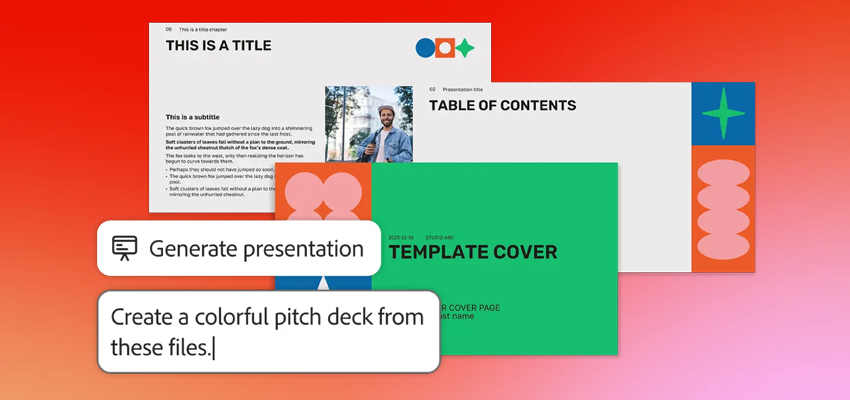
Many of us create professional presentations regularly and it often feels like an uphill battle. The average office worker spends 20 hours a month working on presentations, with a staggering 40 percent of that time consumed by formatting issues alone, according to a study about the time an average officer spends on presentation slides. Generate presentation, a new feature available as a preview in Adobe Express, Acrobat Studio and Acrobat AI Assistant, is designed to solve a familiar challenge: Staring at a blank slide and not knowing where to begin.
Whether you’re a business professional or small business owner, this new feature helps spark ideas and quickly shape an early draft presentation. You can start with professionally designed templates, customise for length or audience and get intelligent outlines as well as a variety of layouts. And when you want to refine your deck, it’s just as easy — rewrite content, recreate or add a slide or swap in a new template without starting from scratch. All of this comes together for fast, easy and professional presentation creation.
Here’s how Generate presentation works:
- Start with your files: Start with a simple prompt in Generate presentation. You can include documents like PDFs, DOCX, PPTX, TXT and XLS to provide more context.
Example prompts may include:
“Create a sales pitch presentation for a new product launch, including key features, target audience and pricing strategy”.
“Create an onboarding presentation for all new employees including steps of orientation and training”.
“Create a campaign strategy presentation for the executive team and partners. Include clear sections for objectives, audience segmentation insights, campaign ideas and a detailed workback schedule. Focus on aligning stakeholders and persuading them on upcoming investments for the new year”.
- Select a template: Choose a professionally designed template, which you can fully customise after generating your content.
- Customise the outline: Review and refine the outline, which is intelligently generated based on your source files. Adjust the audience, length and level of detail of your presentation. Generate presentation adapts your deck to your goals.
- Let Adobe Express bring your ideas to life: Watch as Adobe Express transforms your inputs into a professional-grade presentation in just minutes. With intelligently crafted copy and smart slide layouts, Adobe Express does the heavy lifting so you can focus on delivering your message.
- Refine and personalise: Use Adobe Express’s intuitive editing tools to add your finishing touches. Add or re-generate a single slide or generate individual slides. Include images or videos from Adobe Stock. Rephrase, shorten or change the tone of your copy with one-click. Rewrite, add expressive, eye-catching video and animation and more.
- Present, share or download: Instantly present directly or download as a PDF or PPT. Seamlessly share with others to inform, collaborate or co-edit in real time.
Effective presentations for anyone
From preparing a business pitch to creating a marketing strategy, Adobe’s new Generate presentation helps turn ideas and documents into polished presentations that communicate your story and help you accomplish your goals — effortlessly. Examples include:
- Marketing Professionals: Convert audience insights, campaign performance data or trend reports into visually engaging presentations for internal strategy meetings or external pitches. Use Adobe Express templates to make your presentations more creative.
- Sales Teams: Secure new clients by transforming research documents, client briefs, and market analysis into compelling pitch decks.
- Human Resources: Create polished onboarding decks, company policy updates or compliance presentations in minutes by uploading employee handbooks or training materials. Save time and ensure consistent, professional communication across teams.
- Legal Teams: Simplify complex legal documents into easy-to-understand presentations for internal briefings or client meetings.
- Small Business Owners: Develop professional decks to pitch new products or services, complete with timelines.
You can use Generate presentation to produce any kind of deck. Here are a few ideas:
- Event Vision Boards: Compile wedding inspiration, vendor PDFs and venue brochures into cohesive presentations to align family and planners.
- Travel Itineraries: Turn text-heavy travel blogs and booking confirmations into visual slideshows to share trip plans with companions.
Adobe Express: AI-powered tools bring quick, easy, polished content creation to everyone
Adobe Express is at the heart of Generate presentation, bringing fast, easy and polished content creation to everyone. Whether you’re using the standalone Express app or accessing Generate presentations through Acrobat, Express offers many professionally designed templates to help get you started along with custom visuals and intuitive editing tools. The guided workflow removes design hurdles, helping you create standout presentations with ease.
More innovation coming soon
Adobe continues to redefine how people create and share content with its AI-powered tools. From Adobe Express’ AI Assistant (beta) to Acrobat Studio’s collaborative PDF Spaces, Generate presentation is another chapter in that evolution, using AI to turn ideas into polished, professional decks in minutes — powered by Adobe Express. And with the ability to regenerate or add individual slides without starting over, it’s easier than ever to refine your content as you work.
Is your team ready to create standout content?
Reach out to the Dax Data team to learn more about Adobe’s solutions.