•   sales@daxdata.co.za
  • +27 (0)21 683 3861
  • Marketplace Login
  • “Adobe
Dax DataDax DataDax DataDax Data
  • Home
  • Solutions
    • Creative Cloud
    • Adobe Express
    • Adobe Firefly
    • e-Learning
      • Adobe Captivate
      • Adobe Learning Manager
      • Adobe Connect
    • Document Cloud
      • Adobe Acrobat DC
      • Adobe Acrobat Sign
      • Adobe Acrobat AI Assistant
      • Adobe Acrobat Studio
    • Adobe Substance
  • Partners
  • News
    • Blog
    • Press Office
    • Newsletter
  • Support
  • About Us
  • Contact

11 New ways to accelerate your design journey with Adobe Creative Cloud

    Home Adobe Creative Cloud 11 New ways to accelerate your design journey with Adobe Creative Cloud

    11 New ways to accelerate your design journey with Adobe Creative Cloud

    By editor | Adobe Creative Cloud | Comments are Closed | 1 November, 2025 | 0

    If you make creative content for a living, your work has never been more valuable. Everyone recognises that creativity drives business growth, meaning that the people you work with often want lots of content on quick deadlines. The solution for many creative professionals is to use AI to accelerate their creative process. AI can help with the tasks that slow you down so you can concentrate on being creative.

    Adobe’s new versions of Creative Cloud and Adobe Firefly, released at Adobe MAX, include dozens of new AI-powered features and tools that will help you move faster. Here are 11 new ways you can accelerate your creative process:

    • Brainstorm effortlessly: Firefly Boards is the perfect place to let your imagination flow. You can upload inspirational images and quickly generate new ones. Remix two different assets to see how their styles combine. It’s all collaborative, so you can include your team in the process. Once you’ve decided on an approach, it’s easy to bring what you’ve got into your Creative Cloud apps to continue working.
    • Experiment widely: Adobe has brought the industry’s top AI models into Adobe Firefly and Creative Cloud. This includes access to Adobe’s commercially safe Firefly generative AI models— including the latest Firefly Image Model 5 — as well as leading models from our partners, including Google’s Gemini 2.5 (Nano Banana), among others.
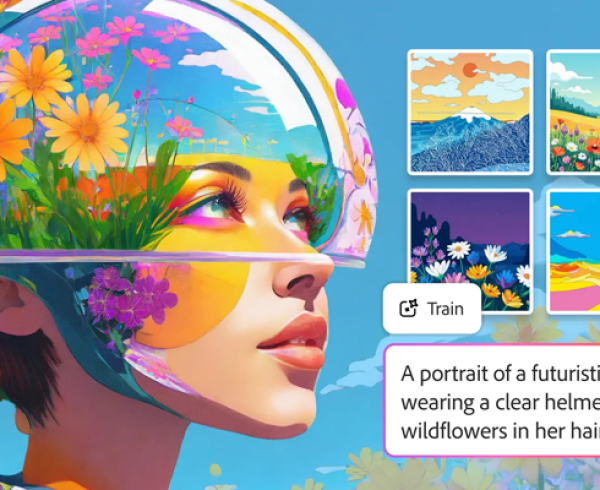
    • Make your own model: Firefly Custom Models custom models allows you to upload 10 of your own images (only work you have rights to is allowed). Firefly will analyse the images and create a model — that only you can use — that produces content in your style.
    • Talk to your tools with agentic AI across Adobe’s apps: We’ve introduced AI Assistants (in beta) in Adobe Express and Photoshop that anticipate your needs, assist in coordination, and keep your projects moving so you can stay focused on your craft.
    • Sharpen your images: Nothing’s more frustrating than having the perfect image in a resolution that’s too low to use. With Generative Upscale in Adobe Photoshop — now equipped with Topaz Labs’ AI models — you can upscale and enhance small, cropped, and other low-resolution images with realistic detail, up to 56 megapixels with Topaz Gigapixel, and 9 megapixels with Topaz Bloom.
    Generative Upscale in PS
    • Make it all work together: It’s easy to take an image of a person and drop it into another scene in Photoshop. What takes time is the compositing — fixing the lighting, colours, shadows, etc. so it looks like your subject was in that scene the whole time. Now available across desktop, mobile and web, Harmonize in Photoshop makes those painstaking tweaks for you — and unlike some other AI tools, it won’t change the way the person looks.
    Harmonize in PS
    • Find your best shots: Adobe Lightroom helps you define what you’re looking for — e.g. sharp focus, everyone looking at the camera, eyes open, etc. — and the new Assisted Culling in Lightroom (public beta) will analyse your portraits and quickly pick the ones that best fit your criteria.
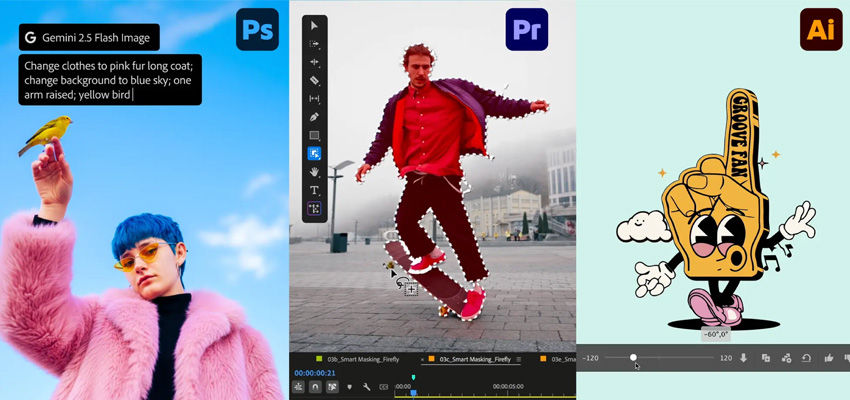
    • Get flexibility when you fill: If you’re like millions of Photoshop and Firefly users, you love Generative Fill, which lets you describe what you want to add to an image and have AI generate it. Now it’s even easier to get exactly what you want because Adobe has added partner models to Generative Fill. Describe the object you’d like to add to an image and you can have it generated by Firefly, Gemini 2.5 Flash Image (Nano Banana), or FLUX.1 Kontext [pro] and decide which image works best.
    • Free yourself from repetitive tasks: With Firefly Creative Production (private beta), you can automatically perform these and many other basic tasks on thousands of images or videos all at once — no coding required.
    • Make a soundtrack in seconds: Using the new Generate Soundtrack (public beta) feature in Adobe Firefly, you can create an original soundtrack that amplifies the meaning and emotion of your video, without infringing on any copyright. Either describe the kind of soundtrack you’re looking for or upload your video and have Firefly analyse it for you and suggest a good prompt. Generate Soundtrack produces music, complete with intros and outros, that matches the length of your video and its overall mood and energy.
    Generate Soundtrack
    • Easily isolate a video’s subject: You shot a one-of-a-kind video of your dog performing tricks, but you hate the ugly parking lot where he was doing it. The new AI Object Mask in Premiere (public beta) eliminates the hassle. Roughly select your beloved canine in one frame and Object Mask will separate him from the background throughout your clip.

    This list covers a lot of great new tools and timesavers, but it’s not even close to everything that Adobe has released for Creative Cloud and Firefly, including new superpowers in Adobe Illustrator, InDesign and more.

    Availability:

    Photoshop’s Generative Fill with Partner Models, Generative Upscale, and Harmonize are all generally available to customers. Premiere’s AI Object Mask, Rectangle, Ellipse and Pen Masking, and Fast Vector Mask are all available in public beta, as is Lightroom’s new AI Assisted Culling feature.

    Firefly’s Image Model 5, Generate Soundtrack, and Generate Speech are available in public beta. Firefly video editor and Firefly Custom Models are in private beta and will begin rolling out next month. AI Assistant in Photoshop is an early preview and will be available in the coming months. Contact the Dax Data team for more information.
    Adobe Firefly, Adobe Illustrator, Adobe Photoshop, Adobe Photoshop Lightroom

    Related Post

    • Discover AI driven video editing enhancements and major motion design updates across Adobe Premiere and After Effects

      By editor | Comments are Closed

      The recent updates to Premiere and After Effects give editors and motion designers faster, more intuitive ways to work while maintaining creative flow and intent. These updates open entirely new ways to tell stronger stories with your effects:Read more

    • Better Value, Smarter Creativity: Introducing Creative Cloud Standard for Teams

      By editor | Comments are Closed

      Dax Data is excited to announce the availability of Creative Cloud Standard for Teams from the 2nd of March 2026 in South Africa, Kenya, Tanzania, Mauritius and Ghana. This solution is available to NEW Adobe Creative CloudRead more

    • New Photoshop Innovations Deliver Unmatched Control, Realism and Precision

      By editor | Comments are Closed

      If you’re a creative professional, you move fast, chasing an idea from first spark to final pixel, and the smallest amount of friction can slow your creative output. Whether you’re compositing multiple elements into aRead more

    • Revolutionise Photo Editing with Photoshop in ChatGPT

      By editor | Comments are Closed

      Adobe is empowering anyone to edit with Photoshop directly in ChatGPT, making this iconic creativity tool accessible for everyone. If you have an idea, you can use Photoshop for ChatGPT to make edits to photos,Read more

    • Adobe Premiere 25.6: Smarter Search, Speedier Edits and Effortless Collaboration

      By editor | Comments are Closed

      The newest version of Adobe Premiere brings next-level intelligence, speed, and collaboration to every part of your video workflow. Whether you’re cutting on your desktop or on the go, Premiere now brings a family of toolsRead more

    Recent Posts

    • 1 April, 2026
      Comments Off on Discover AI driven video editing enhancements and major motion design updates across Adobe Premiere and After Effects

      Discover AI driven video editing enhancements and major motion design updates across Adobe Premiere and After Effects

    • 1 April, 2026
      Comments Off on Elevate Your Adobe Connect Room with Custom Virtual Backgrounds

      Elevate Your Adobe Connect Room with Custom Virtual Backgrounds

    • 1 April, 2026
      Comments Off on The Offers You’ve Been Waiting For Are Back: Save Up to 50% on Adobe Acrobat Sign Transactions

      The Offers You’ve Been Waiting For Are Back: Save Up to 50% on Adobe Acrobat Sign Transactions

    • 1 March, 2026
      Comments Off on Adobe Connect Introduces New Features to Enhance Virtual Experiences

      Adobe Connect Introduces New Features to Enhance Virtual Experiences

    Tags

    Acrobat DC Adobe Adobe Acrobat DC Adobe Acrobat Sign Adobe After Effects Adobe Captivate Adobe Captivate Prime Adobe Connect Adobe Creative Cloud Adobe Express Adobe Firefly Adobe Illustrator Adobe Photoshop Adobe Photoshop Lightroom Adobe Premiere Pro Adobe Sign Adobe Stock Adobe Substance 3D Android Apps Collaboration Creative Cloud CTIAF Devices digital transformation e-signatures eLearning iOS iPad Microsoft Mobile Newsletter Office365 Online Photography Photoshop Productivity Promo Promotion South Africa updates Virtual Platform Web conferencing Webinar Webinars

    Categories

    • Adobe
    • Adobe Acrobat Studio
    • Adobe Animate
    • Adobe Connect
    • Adobe Connect
    • Adobe Creative Cloud
    • Adobe Document Cloud
    • Adobe Photoshop
    • Adobe Photoshop Sketch
    • AppRiver
    • Collaboration
    • Compliance
    • Creative Cloud
    • Digital Imaging
    • Digital Publishing Suite
    • eLearning
    • Micro Focus
    • Microsoft
    • Newsletter
    • Office Productivity
    • Other
    • Photography
    • Security & Management
    • Tutorial
    • Uncategorized
    • Dax Data Logo
    •   Unit 1 Melomed Office Park
      Punters Way
      Kenilworth
      Cape Town
      7708
    •   +27 (0)21 683 3861
    •   0860 101 604
    •   sales@daxdata.co.za

    Useful Links

    • Creative Cloud
    • e-Learning
    • Document Cloud
    • Newsletter
    • Marketplace Login

    Recent Posts

    • Discover AI driven video editing enhancements and major motion design updates across Adobe Premiere and After Effects

      The recent updates to Premiere and After Effects give editors and motion designers faster, more

      1 April, 2026
    • Elevate Your Adobe Connect Room with Custom Virtual Backgrounds

      One of the first things Alistair Lee (Sr. Product Enablement Manager, Adobe

      1 April, 2026
    Copyright © 2025 Dax Data. All Rights Reserved.  |  Privacy Policy
    • Home
    • Solutions
      • Creative Cloud
      • Adobe Express
      • Adobe Firefly
      • e-Learning
        • Adobe Captivate
        • Adobe Learning Manager
        • Adobe Connect
      • Document Cloud
        • Adobe Acrobat DC
        • Adobe Acrobat Sign
        • Adobe Acrobat AI Assistant
        • Adobe Acrobat Studio
      • Adobe Substance
    • Partners
    • News
      • Blog
      • Press Office
      • Newsletter
    • Support
    • About Us
    • Contact
    Dax Data