•   sales@daxdata.co.za
  • +27 (0)21 683 3861
  • Marketplace Login
  • “Adobe
Dax DataDax DataDax DataDax Data
  • Home
  • Solutions
    • Creative Cloud
    • Adobe Express
    • Adobe Firefly
    • e-Learning
      • Adobe Captivate
      • Adobe Learning Manager
      • Adobe Connect
    • Document Cloud
      • Adobe Acrobat DC
      • Adobe Acrobat Sign
      • Adobe Acrobat AI Assistant
      • Adobe Acrobat Studio
    • Adobe Substance
  • Partners
  • News
    • Blog
    • Press Office
    • Newsletter
  • Support
  • About Us
  • Contact

Your Favourite Messaging App Just Got Smarter – Thanks to Adobe Acrobat

    Home Adobe Document Cloud Your Favourite Messaging App Just Got Smarter – Thanks to Adobe Acrobat

    Your Favourite Messaging App Just Got Smarter – Thanks to Adobe Acrobat

    By editor | Adobe Document Cloud | Comments are Closed | 1 May, 2026 | 0

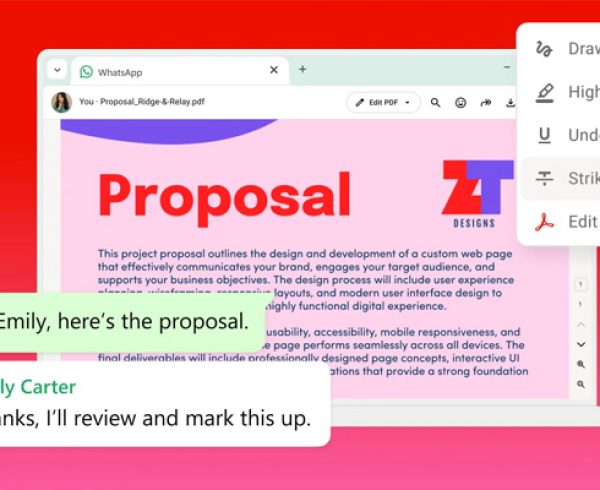
    Adobe and WhatsApp are bringing Acrobat-powered PDF experiences directly into WhatsApp Web, so you can open, understand, and act on your documents right in your chat without needing to download files or switch tools.

    Many of WhatsApp’s three billion users already use the platform to share files and move work forward. Adobe Acrobat has long delivered trusted PDF viewing, collaboration, and AI-powered productivity in the places where documents are actively used. Integrating Acrobat into WhatsApp extends that value, so you can stay in the flow whether you’re reviewing an invoice, checking a contract, looking over a design, or confirming details.

    “Acrobat is built to power document workflows wherever they happen”, said Abhigyan Modi, Senior Vice President, Creativity & Productivity Business. “Bringing PDF capabilities into WhatsApp Web extends that vision into one of the world’s most important communication platforms”.

    Open PDFs instantly without leaving your chat

    Now, when someone shares a PDF in WhatsApp Web, you can open it instantly in the conversation. Scroll, zoom, and read the full document without downloading the file or switching apps. Password-protected files stay secure, ensuring only the intended recipients can access them.

    With Acrobat powering the experience, your documents render exactly as intended, preserving layout and formatting. Documents shared within your chats remain end-to-end encrypted like all other personal messages, meaning that only those in the chat can read them. When documents remain within the thread, it’s easy to review, reference, and act on them without losing the context of the conversation.

    Built for how you actually work

    For many people around the world, WhatsApp is where professional and personal work gets done. Documents play a central role in that experience.

    Whether you’re sharing invoices or catalogues with customers, reviewing contracts with collaborators, submitting assignments or forms, or coordinating plans with shared itineraries, PDFs are part of an ongoing exchange that drives decisions.

    On larger screens, this becomes even more powerful. WhatsApp Web gives you the space to read, compare, and respond in real time while staying connected to the conversation. With Acrobat powering the experience, everything looks as intended.

    Edit, share and unlock more with Acrobat

    When you need to make changes, you can click Edit in Acrobat directly from WhatsApp Web. From there, in Acrobat, you can fill out forms, annotate, and markup documents with ease. For more advanced needs, Acrobat gives you tools to organise pages, apply password protection, and prepare files for signing. With Acrobat AI Assistant you can also summarise documents, ask questions, and surface key insights in seconds. Advanced editing and AI Assistant capabilities are available with an Acrobat subscription. Once you’re done, just share the updated file back into the same WhatsApp conversation, so everyone stays aligned on the latest version.

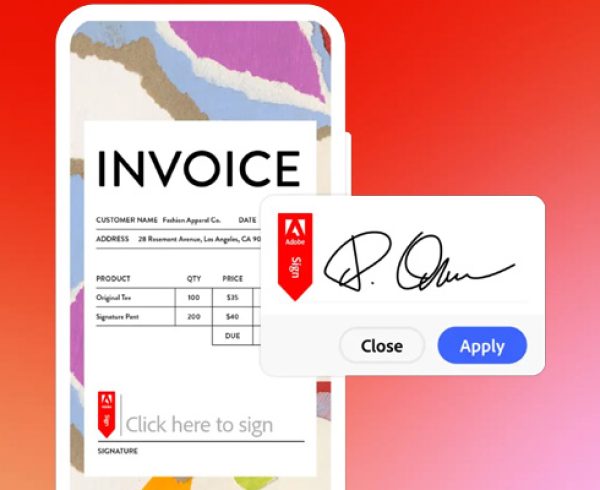
    This makes everyday workflows smoother. Whether you’re browsing a catalogue and confirming selections, sending an invoice, reviewing contract terms, flagging changes, or sharing edits, everything happens in one thread without breaking your flow. From first open to final version, everything stays connected.

    Available now, with more to come

    This experience is now available globally on WhatsApp Web and includes:

    • Acrobat-powered PDF previews that open directly in your conversation
    • Full-screen viewing in chat, including password-protected files
    • One-click access to Acrobat for annotating documents, filling forms, and advanced editing

    Support for WhatsApp on Windows and additional features are coming soon.

    Keep work moving at the speed of chat

    Work moves faster when your documents are right where you need them. By bringing Acrobat-powered PDF experiences into WhatsApp Web, you can go from receiving a document to acting on it instantly. And with Acrobat’s full capabilities, including AI Assistant, every document in your chat becomes something you can understand, edit, and move forward.

    Contact the Dax Data team to find out how your organisation can stay on top of documents with powerful features for desktop, mobile and web.

    Adobe AI Assistant

    Related Post

    • The Offers You’ve Been Waiting For Are Back: Save Up to 50% on Adobe Acrobat Sign Transactions

      By editor | Comments are Closed

      Dax Data is pleased to announce the long-awaited return of the two successful Adobe Acrobat Sign offers. Get up to 50% off one Introductory Pack of 1500 or 3000 Adobe Acrobat Sign Transactions. Drive businessRead more

    • Smarter Upgrades, Bigger Savings with Adobe Acrobat Studio

      By editor | Comments are Closed

      Dax Data and Adobe are thrilled to roll out a powerful new Acrobat Studio Upgrade Offer that makes upgrading Acrobat Pro and Standard customers to Acrobat Studio smoother than ever. *Eligible customers can enjoy a 15%Read more

    • Go From Idea to Impact in Minutes with Adobe Generate Presentation

      By editor | Comments are Closed

      Many of us create professional presentations regularly and it often feels like an uphill battle. The average office worker spends 20 hours a month working on presentations, with a staggering 40 percent of that timeRead more

    • Adobe Acrobat AI Assistant: Confidently Manage Contracts with Ease

      By editor | Comments are Closed

      For most people, contracts are essential, but they’re also usually complex, boring to read, and hard to parse. Adobe Acrobat AI Assistant now offers new capabilities to help business people quickly and easily understand a singleRead more

    • Introducing Acrobat Sign’s next generation e-sign experience

      By editor | Comments are Closed

      Business moves at the speed of a signature. For businesses, a signature represents the last mile in their journey to acquire or service customers. Each year, hundreds of millions of users electronically sign agreements. ManyRead more

    Recent Posts

    • 1 May, 2026
      Comments Off on Your Favourite Messaging App Just Got Smarter – Thanks to Adobe Acrobat

      Your Favourite Messaging App Just Got Smarter – Thanks to Adobe Acrobat

    • 1 May, 2026
      Comments Off on Discover and refine exceptional content with Adobe Stock’s redesigned platform

      Discover and refine exceptional content with Adobe Stock’s redesigned platform

    • 1 April, 2026
      Comments Off on Discover AI driven video editing enhancements and major motion design updates across Adobe Premiere and After Effects

      Discover AI driven video editing enhancements and major motion design updates across Adobe Premiere and After Effects

    • 1 April, 2026
      Comments Off on Elevate Your Adobe Connect Room with Custom Virtual Backgrounds

      Elevate Your Adobe Connect Room with Custom Virtual Backgrounds

    Tags

    Acrobat DC Adobe Adobe Acrobat DC Adobe Acrobat Sign Adobe After Effects Adobe Captivate Adobe Captivate Prime Adobe Connect Adobe Creative Cloud Adobe Express Adobe Firefly Adobe Illustrator Adobe Photoshop Adobe Photoshop Lightroom Adobe Premiere Pro Adobe Sign Adobe Stock Adobe Substance 3D Adobe XD Android Apps Collaboration Creative Cloud CTIAF Devices digital transformation e-signatures eLearning iOS iPad Microsoft Mobile Newsletter Online Photography Photoshop Productivity Promo Promotion South Africa updates Virtual Platform Web conferencing Webinar Webinars

    Categories

    • Adobe
    • Adobe Acrobat Studio
    • Adobe Animate
    • Adobe Connect
    • Adobe Connect
    • Adobe Creative Cloud
    • Adobe Document Cloud
    • Adobe Photoshop
    • Adobe Photoshop Sketch
    • AppRiver
    • Collaboration
    • Compliance
    • Creative Cloud
    • Digital Imaging
    • Digital Publishing Suite
    • eLearning
    • Micro Focus
    • Microsoft
    • Newsletter
    • Office Productivity
    • Other
    • Photography
    • Security & Management
    • Tutorial
    • Uncategorized
    • Dax Data Logo
    •   Unit 1 Melomed Office Park
      Punters Way
      Kenilworth
      Cape Town
      7708
    •   +27 (0)21 683 3861
    •   0860 101 604
    •   sales@daxdata.co.za

    Useful Links

    • Creative Cloud
    • e-Learning
    • Document Cloud
    • Newsletter
    • Marketplace Login

    Recent Posts

    • Your Favourite Messaging App Just Got Smarter – Thanks to Adobe Acrobat

      Adobe and WhatsApp are bringing Acrobat-powered PDF experiences directly into WhatsApp Web,

      1 May, 2026
    • Discover and refine exceptional content with Adobe Stock’s redesigned platform

      Adobe Stock’s collection offers nearly a billion images, videos, music tracks, illustrations

      1 May, 2026
    Copyright © 2025 Dax Data. All Rights Reserved.  |  Privacy Policy
    • Home
    • Solutions
      • Creative Cloud
      • Adobe Express
      • Adobe Firefly
      • e-Learning
        • Adobe Captivate
        • Adobe Learning Manager
        • Adobe Connect
      • Document Cloud
        • Adobe Acrobat DC
        • Adobe Acrobat Sign
        • Adobe Acrobat AI Assistant
        • Adobe Acrobat Studio
      • Adobe Substance
    • Partners
    • News
      • Blog
      • Press Office
      • Newsletter
    • Support
    • About Us
    • Contact
    Dax Data