•   sales@daxdata.co.za
  • +27 (0)21 683 3861
  • Marketplace Login
  • “Adobe
Dax DataDax DataDax DataDax Data
  • Home
  • Solutions
    • Creative Cloud
    • Adobe Express
    • Adobe Firefly
    • e-Learning
      • Adobe Captivate
      • Adobe Learning Manager
      • Adobe Connect
    • Document Cloud
      • Adobe Acrobat DC
      • Adobe Acrobat Sign
      • Adobe Acrobat AI Assistant
      • Adobe Acrobat Studio
    • Adobe Substance
  • Partners
  • News
    • Blog
    • Press Office
    • Newsletter
  • Support
  • About Us
  • Contact

Adobe Illustrator: More of the Tools and Speed You Need

    Home Adobe Creative Cloud Adobe Illustrator: More of the Tools and Speed You Need

    Adobe Illustrator: More of the Tools and Speed You Need

    By editor | Adobe Creative Cloud | Comments are Closed | 1 March, 2025 | 0

    At Adobe MAX Japan, Adobe unveiled a number of Adobe Illustrator innovations to deliver an even faster, more performant and modernised experience for creators.

    Many of these advances are driven by direct community feedback from UserVoice, social channels, and Illustrator community forums. Building on the success of user-inspired features like Mockup to more accurate vector graphics with Image Trace, Adobe is focused on enabling creators to design outstanding vector artwork with more speed, precision, and power.

    The latest release features significant workflow and performance improvements, functionality to quickly find the perfect font as well as advances in Japanese typography capabilities.

    Time-saving performance enhancements

    Adobe understands that the performance of day-to-day tasks is crucial to your creative workflow in Illustrator, especially when working with complex, asset-heavy files. Adobe’s teams are always looking for new opportunities to make these workflows faster and smoother to keep up and not stand in the way of your creative flow.

    With this release, Adobe focused on bringing multithreading capabilities to Illustrator, and you’ll notice meaningful improvements in common asset workflows, particularly when working with images and effects:

    • Up to 10x faster performance when converting linked images to embedded images.
    • Up to 5x faster image processing, including importing, dragging and dropping, or placing images on the artboard (for JPEG, PNG, TIFF, and Photoshop files).
    • Up to 5x faster performance when working with the five most used effects (Drop Shadow, Blur, Inner Glow, Outer Glow, and Rasterize).
    • Smoother and faster layer operations, including Hide, Unhide, Expand, Collapse, Scrolling up and down, etc in the layers panel.

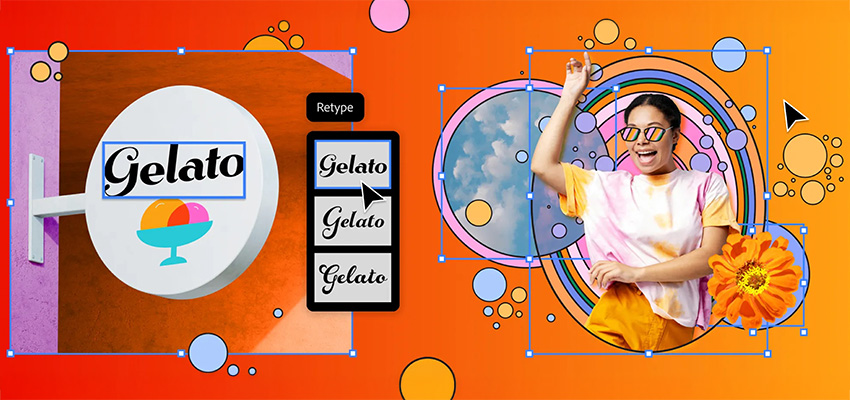
    Quickly find that perfect font with Retype

    Retype takes the headache out of finding the perfect font. Let’s say you’re out and about and spot a cool font you’d like to use. Or you’d like to work with a font from one of your old designs but can’t quite remember its name. With Retype you can quickly identify the font of static text used in raster images or outlined text and explore similar fonts. Retype searches through the library of 30,000+ Adobe Fonts directly in Illustrator, as well as your local font library eliminating the need to sift through thousands of fonts to find the one that matches your design!

    Once you’ve found the right font, you can edit it effortlessly. Based on pre-release feedback, Adobe has further improved and simplified Retype: you can now match a font in just a few steps, add the matched font to your favourite fonts, and then use it in your project. Retype is also going global, now supporting Japanese, French, and German in addition to English.

    Work more efficiently with Japanese typography

    Japanese designs are known for their rich typography. In Adobe’s conversations with community members, they’ve learned that users spend a significant amount of time manually adjusting their type designs to bring them closer to Japanese standards. From these learnings, user feedback, and active engagement with experts, they’ve made significant improvements to Japanese type layout in Illustrator, saving crucial design time.
    Reflow Viewer

    Users can now also use the new Reflow Viewer feature (launched at Adobe MAX in October 2024) to inform and assist with updating old documents to new and improved type layouts.

    At MAX Japan, Adobe is also introducing a path-breaking new Japanese variable font called Momochidori, featuring variable em-box and coloured glyphs. Illustrator now also comes with added support for variable em-box as well as support for COLR fonts, so users will now be able to use this class of fonts available on their operating systems (by default). In addition, they have also added dozens of new Japanese fonts to the Adobe Fonts library, which now includes over 950 Japanese fonts.

    Along with improvements to Japanese typography, Adobe has also made substantial improvements to Korean typography, ensuring adherence to regional standards and boosting productivity in this key aspect of design.

    Delivering three top user-requested enhancements 

    The latest Illustrator release also includes three common user asks to improve workflows:

    • Patterns and gradients: Save your favourite patterns and colour gradients directly to your Creative Cloud Library, so you can quickly share them with your team or clients.
    • Area calculation: Easily calculate the area of a shape or closed path.
    • Fonts: Embed fonts directly into your Illustrator files to ensure your work is always true to your vision, even if your file is opened on a machine that is missing your font.

    Try out the new features for a faster experience

    Whether it’s user-led performance enhancements or innovations like Retype, Reflow Viewer, or adding more expression and precision to East Asian text layouts — experiment with all the new features by updating Illustrator to the latest version.

    These latest performance enhancements are just the beginning. Adobe has an extensive roadmap of further improvements planned, so stay tuned for more updates throughout 2025.

    Create best-in-class graphics with the most powerful Illustrator yet. Track down the perfect font. Turn 2D into 3D. Do it all with precision and up to 10x faster speeds. Contact the Dax Data team for more details.


    Adobe Illustrator

    Related Post

    • Discover AI driven video editing enhancements and major motion design updates across Adobe Premiere and After Effects

      By editor | Comments are Closed

      The recent updates to Premiere and After Effects give editors and motion designers faster, more intuitive ways to work while maintaining creative flow and intent. These updates open entirely new ways to tell stronger stories with your effects:Read more

    • Better Value, Smarter Creativity: Introducing Creative Cloud Standard for Teams

      By editor | Comments are Closed

      Dax Data is excited to announce the availability of Creative Cloud Standard for Teams from the 2nd of March 2026 in South Africa, Kenya, Tanzania, Mauritius and Ghana. This solution is available to NEW Adobe Creative CloudRead more

    • New Photoshop Innovations Deliver Unmatched Control, Realism and Precision

      By editor | Comments are Closed

      If you’re a creative professional, you move fast, chasing an idea from first spark to final pixel, and the smallest amount of friction can slow your creative output. Whether you’re compositing multiple elements into aRead more

    • Revolutionise Photo Editing with Photoshop in ChatGPT

      By editor | Comments are Closed

      Adobe is empowering anyone to edit with Photoshop directly in ChatGPT, making this iconic creativity tool accessible for everyone. If you have an idea, you can use Photoshop for ChatGPT to make edits to photos,Read more

    • Adobe Premiere 25.6: Smarter Search, Speedier Edits and Effortless Collaboration

      By editor | Comments are Closed

      The newest version of Adobe Premiere brings next-level intelligence, speed, and collaboration to every part of your video workflow. Whether you’re cutting on your desktop or on the go, Premiere now brings a family of toolsRead more

    Recent Posts

    • 1 April, 2026
      Comments Off on Discover AI driven video editing enhancements and major motion design updates across Adobe Premiere and After Effects

      Discover AI driven video editing enhancements and major motion design updates across Adobe Premiere and After Effects

    • 1 April, 2026
      Comments Off on Elevate Your Adobe Connect Room with Custom Virtual Backgrounds

      Elevate Your Adobe Connect Room with Custom Virtual Backgrounds

    • 1 April, 2026
      Comments Off on The Offers You’ve Been Waiting For Are Back: Save Up to 50% on Adobe Acrobat Sign Transactions

      The Offers You’ve Been Waiting For Are Back: Save Up to 50% on Adobe Acrobat Sign Transactions

    • 1 March, 2026
      Comments Off on Adobe Connect Introduces New Features to Enhance Virtual Experiences

      Adobe Connect Introduces New Features to Enhance Virtual Experiences

    Tags

    Acrobat DC Adobe Adobe Acrobat DC Adobe Acrobat Sign Adobe After Effects Adobe Captivate Adobe Captivate Prime Adobe Connect Adobe Creative Cloud Adobe Express Adobe Firefly Adobe Illustrator Adobe Photoshop Adobe Photoshop Lightroom Adobe Premiere Pro Adobe Sign Adobe Stock Adobe Substance 3D Android Apps Collaboration Creative Cloud CTIAF Devices digital transformation e-signatures eLearning iOS iPad Microsoft Mobile Newsletter Office365 Online Photography Photoshop Productivity Promo Promotion South Africa updates Virtual Platform Web conferencing Webinar Webinars

    Categories

    • Adobe
    • Adobe Acrobat Studio
    • Adobe Animate
    • Adobe Connect
    • Adobe Connect
    • Adobe Creative Cloud
    • Adobe Document Cloud
    • Adobe Photoshop
    • Adobe Photoshop Sketch
    • AppRiver
    • Collaboration
    • Compliance
    • Creative Cloud
    • Digital Imaging
    • Digital Publishing Suite
    • eLearning
    • Micro Focus
    • Microsoft
    • Newsletter
    • Office Productivity
    • Other
    • Photography
    • Security & Management
    • Tutorial
    • Uncategorized
    • Dax Data Logo
    •   Unit 1 Melomed Office Park
      Punters Way
      Kenilworth
      Cape Town
      7708
    •   +27 (0)21 683 3861
    •   0860 101 604
    •   sales@daxdata.co.za

    Useful Links

    • Creative Cloud
    • e-Learning
    • Document Cloud
    • Newsletter
    • Marketplace Login

    Recent Posts

    • Discover AI driven video editing enhancements and major motion design updates across Adobe Premiere and After Effects

      The recent updates to Premiere and After Effects give editors and motion designers faster, more

      1 April, 2026
    • Elevate Your Adobe Connect Room with Custom Virtual Backgrounds

      One of the first things Alistair Lee (Sr. Product Enablement Manager, Adobe

      1 April, 2026
    Copyright © 2025 Dax Data. All Rights Reserved.  |  Privacy Policy
    • Home
    • Solutions
      • Creative Cloud
      • Adobe Express
      • Adobe Firefly
      • e-Learning
        • Adobe Captivate
        • Adobe Learning Manager
        • Adobe Connect
      • Document Cloud
        • Adobe Acrobat DC
        • Adobe Acrobat Sign
        • Adobe Acrobat AI Assistant
        • Adobe Acrobat Studio
      • Adobe Substance
    • Partners
    • News
      • Blog
      • Press Office
      • Newsletter
    • Support
    • About Us
    • Contact
    Dax Data