•   sales@daxdata.co.za
  • +27 (0)21 683 3861
  • Marketplace Login
  • “Adobe
Dax DataDax DataDax DataDax Data
  • Home
  • Solutions
    • Creative Cloud
    • Adobe Express
    • Adobe Firefly
    • e-Learning
      • Adobe Captivate
      • Adobe Learning Manager
      • Adobe Connect
    • Document Cloud
      • Adobe Acrobat DC
      • Adobe Acrobat Sign
      • Adobe Acrobat AI Assistant
      • Adobe Acrobat Studio
    • Adobe Substance
  • Partners
  • News
    • Blog
    • Press Office
    • Newsletter
  • Support
  • About Us
  • Contact

Adobe Illustrator: More of the Tools and Speed You Need

    Home Adobe Creative Cloud Adobe Illustrator: More of the Tools and Speed You Need

    Adobe Illustrator: More of the Tools and Speed You Need

    By editor | Adobe Creative Cloud | Comments are Closed | 1 March, 2025 | 0

    At Adobe MAX Japan, Adobe unveiled a number of Adobe Illustrator innovations to deliver an even faster, more performant and modernised experience for creators.

    Many of these advances are driven by direct community feedback from UserVoice, social channels, and Illustrator community forums. Building on the success of user-inspired features like Mockup to more accurate vector graphics with Image Trace, Adobe is focused on enabling creators to design outstanding vector artwork with more speed, precision, and power.

    The latest release features significant workflow and performance improvements, functionality to quickly find the perfect font as well as advances in Japanese typography capabilities.

    Time-saving performance enhancements

    Adobe understands that the performance of day-to-day tasks is crucial to your creative workflow in Illustrator, especially when working with complex, asset-heavy files. Adobe’s teams are always looking for new opportunities to make these workflows faster and smoother to keep up and not stand in the way of your creative flow.

    With this release, Adobe focused on bringing multithreading capabilities to Illustrator, and you’ll notice meaningful improvements in common asset workflows, particularly when working with images and effects:

    • Up to 10x faster performance when converting linked images to embedded images.
    • Up to 5x faster image processing, including importing, dragging and dropping, or placing images on the artboard (for JPEG, PNG, TIFF, and Photoshop files).
    • Up to 5x faster performance when working with the five most used effects (Drop Shadow, Blur, Inner Glow, Outer Glow, and Rasterize).
    • Smoother and faster layer operations, including Hide, Unhide, Expand, Collapse, Scrolling up and down, etc in the layers panel.

    Quickly find that perfect font with Retype

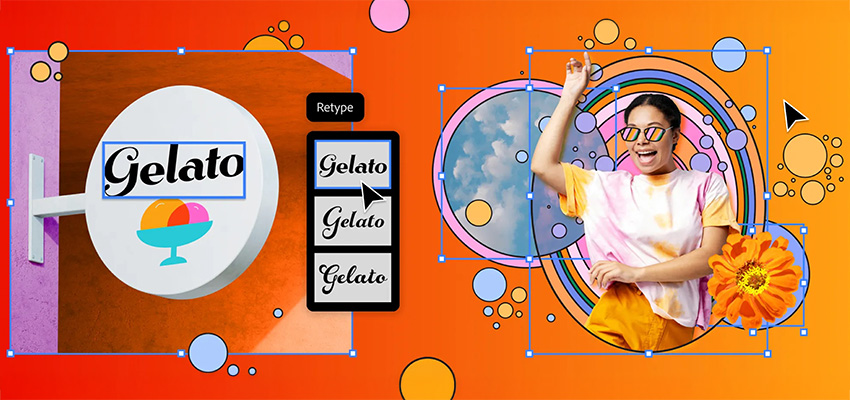
    Retype takes the headache out of finding the perfect font. Let’s say you’re out and about and spot a cool font you’d like to use. Or you’d like to work with a font from one of your old designs but can’t quite remember its name. With Retype you can quickly identify the font of static text used in raster images or outlined text and explore similar fonts. Retype searches through the library of 30,000+ Adobe Fonts directly in Illustrator, as well as your local font library eliminating the need to sift through thousands of fonts to find the one that matches your design!

    Once you’ve found the right font, you can edit it effortlessly. Based on pre-release feedback, Adobe has further improved and simplified Retype: you can now match a font in just a few steps, add the matched font to your favourite fonts, and then use it in your project. Retype is also going global, now supporting Japanese, French, and German in addition to English.

    Work more efficiently with Japanese typography

    Japanese designs are known for their rich typography. In Adobe’s conversations with community members, they’ve learned that users spend a significant amount of time manually adjusting their type designs to bring them closer to Japanese standards. From these learnings, user feedback, and active engagement with experts, they’ve made significant improvements to Japanese type layout in Illustrator, saving crucial design time.
    Reflow Viewer

    Users can now also use the new Reflow Viewer feature (launched at Adobe MAX in October 2024) to inform and assist with updating old documents to new and improved type layouts.

    At MAX Japan, Adobe is also introducing a path-breaking new Japanese variable font called Momochidori, featuring variable em-box and coloured glyphs. Illustrator now also comes with added support for variable em-box as well as support for COLR fonts, so users will now be able to use this class of fonts available on their operating systems (by default). In addition, they have also added dozens of new Japanese fonts to the Adobe Fonts library, which now includes over 950 Japanese fonts.

    Along with improvements to Japanese typography, Adobe has also made substantial improvements to Korean typography, ensuring adherence to regional standards and boosting productivity in this key aspect of design.

    Delivering three top user-requested enhancements 

    The latest Illustrator release also includes three common user asks to improve workflows:

    • Patterns and gradients: Save your favourite patterns and colour gradients directly to your Creative Cloud Library, so you can quickly share them with your team or clients.
    • Area calculation: Easily calculate the area of a shape or closed path.
    • Fonts: Embed fonts directly into your Illustrator files to ensure your work is always true to your vision, even if your file is opened on a machine that is missing your font.

    Try out the new features for a faster experience

    Whether it’s user-led performance enhancements or innovations like Retype, Reflow Viewer, or adding more expression and precision to East Asian text layouts — experiment with all the new features by updating Illustrator to the latest version.

    These latest performance enhancements are just the beginning. Adobe has an extensive roadmap of further improvements planned, so stay tuned for more updates throughout 2025.

    Create best-in-class graphics with the most powerful Illustrator yet. Track down the perfect font. Turn 2D into 3D. Do it all with precision and up to 10x faster speeds. Contact the Dax Data team for more details.
    Adobe Illustrator

    Related Post

    • Meet the New Adobe Firefly: Intelligent AI Agents and a More Powerful Creative Experience

      By editor | Comments are Closed

      Adobe has built Firefly as an all-in-one creative AI studio and they’re introducing new capabilities that remove even more of the friction between imagination and finished work. Firefly AI Assistant (beta), powered by Adobe’s creative agent, now includesRead more

    • New Creative Cloud Features Streamline Every Stage of the Creative Process

      By editor | Comments are Closed

      Have you ever spent hours manually reviewing thousands of photos from an event or portrait shoot to find the selects your clients will love? Redrawn a roto mask from scratch because the footage moved? TakenRead more

    • Big Creative Power for Small Teams: Creative Cloud Standard Now Available for Teams with 1-9 Users

      By editor | Comments are Closed

      Great news for small businesses, creative agencies, and growing teams: Adobe Creative Cloud Standard for Teams is now available to organisations requiring 1-9 seats, expanding eligibility beyond the previous 2-9 seat requirement. This makes itRead more

    • From Almost to Exact: Adobe Firefly’s Latest Image Editing Upgrades

      By editor | Comments are Closed

      If you’ve ever used AI to create an image and thought, “This is close, but not quite what I imagined”, then you’re going to love Precision Flow and AI Markup, two new powerful and intuitive editing tools in AdobeRead more

    • Adobe for creativity: a new way to create with Adobe, now in Claude

      By editor | Comments are Closed

      Creative ideas and work can take shape across many places, and Adobe wants you to be able to create with the best of their tools directly in the surfaces where you work. Adobe is excitedRead more

    Recent Posts

    • 1 July, 2026
      Comments Off on Meet the New Adobe Firefly: Intelligent AI Agents and a More Powerful Creative Experience

      Meet the New Adobe Firefly: Intelligent AI Agents and a More Powerful Creative Experience

    • 1 July, 2026
      Comments Off on New Creative Cloud Features Streamline Every Stage of the Creative Process

      New Creative Cloud Features Streamline Every Stage of the Creative Process

    • 1 July, 2026
      Comments Off on Big Creative Power for Small Teams: Creative Cloud Standard Now Available for Teams with 1-9 Users

      Big Creative Power for Small Teams: Creative Cloud Standard Now Available for Teams with 1-9 Users

    • 1 June, 2026
      Comments Off on From Almost to Exact: Adobe Firefly’s Latest Image Editing Upgrades

      From Almost to Exact: Adobe Firefly’s Latest Image Editing Upgrades

    Tags

    Acrobat DC Adobe Adobe Acrobat DC Adobe Acrobat Sign Adobe After Effects Adobe Captivate Adobe Captivate Prime Adobe Connect Adobe Creative Cloud Adobe Express Adobe Firefly Adobe Illustrator Adobe InDesign Adobe Photoshop Adobe Photoshop Lightroom Adobe Premiere Pro Adobe Sign Adobe Stock Adobe Substance 3D Adobe XD Android Collaboration Creative Cloud CTIAF Devices digital transformation e-signatures eLearning iOS iPad Microsoft Mobile Newsletter Online Photography Photoshop Productivity Promo Promotion South Africa updates Virtual Platform Web conferencing Webinar Webinars

    Categories

    • Adobe
    • Adobe Acrobat Studio
    • Adobe Animate
    • Adobe Connect
    • Adobe Connect
    • Adobe Creative Cloud
    • Adobe Document Cloud
    • Adobe Photoshop
    • Adobe Photoshop Sketch
    • AppRiver
    • Collaboration
    • Compliance
    • Creative Cloud
    • Digital Imaging
    • Digital Publishing Suite
    • eLearning
    • Micro Focus
    • Microsoft
    • Newsletter
    • Office Productivity
    • Other
    • Photography
    • Security & Management
    • Tutorial
    • Uncategorized
    • Dax Data Logo
    •   Unit 1 Melomed Office Park
      Punters Way
      Kenilworth
      Cape Town
      7708
    •   +27 (0)21 683 3861
    •   0860 101 604
    •   sales@daxdata.co.za

    Useful Links

    • Creative Cloud
    • e-Learning
    • Document Cloud
    • Newsletter
    • Marketplace Login

    Recent Posts

    • Meet the New Adobe Firefly: Intelligent AI Agents and a More Powerful Creative Experience

      Adobe has built Firefly as an all-in-one creative AI studio and they’re introducing new

      1 July, 2026
    • New Creative Cloud Features Streamline Every Stage of the Creative Process

      Have you ever spent hours manually reviewing thousands of photos from an

      1 July, 2026
    Copyright © 2025 Dax Data. All Rights Reserved.  |  Privacy Policy
    • Home
    • Solutions
      • Creative Cloud
      • Adobe Express
      • Adobe Firefly
      • e-Learning
        • Adobe Captivate
        • Adobe Learning Manager
        • Adobe Connect
      • Document Cloud
        • Adobe Acrobat DC
        • Adobe Acrobat Sign
        • Adobe Acrobat AI Assistant
        • Adobe Acrobat Studio
      • Adobe Substance
    • Partners
    • News
      • Blog
      • Press Office
      • Newsletter
    • Support
    • About Us
    • Contact
    Dax Data