•   sales@daxdata.co.za
  • +27 (0)21 683 3861
  • Marketplace Login
  • “Adobe
Dax DataDax DataDax DataDax Data
  • Home
  • Solutions
    • Creative Cloud
    • Adobe Express
    • Adobe Firefly
    • e-Learning
      • Adobe Captivate
      • Adobe Learning Manager
      • Adobe Connect
    • Document Cloud
      • Adobe Acrobat DC
      • Adobe Acrobat Sign
      • Adobe Acrobat AI Assistant
      • Adobe Acrobat Studio
    • Adobe Substance
  • Partners
  • News
    • Blog
    • Press Office
    • Newsletter
  • Support
  • About Us
  • Contact

Revolutionise Photo Editing with Photoshop in ChatGPT

    Home Adobe Creative Cloud Revolutionise Photo Editing with Photoshop in ChatGPT

    Revolutionise Photo Editing with Photoshop in ChatGPT

    By editor | Adobe Creative Cloud | Comments are Closed | 1 February, 2026 | 0

    Adobe is empowering anyone to edit with Photoshop directly in ChatGPT, making this iconic creativity tool accessible for everyone. If you have an idea, you can use Photoshop for ChatGPT to make edits to photos, just by describing what you want in your own words.

    The combination of the world’s leading creative app and the world’s leading chat platform is a match made in creativity heaven, combining the power and precision of Photoshop with the ease and accessibility of ChatGPT’s conversational interface.

    But the benefits don’t stop with Photoshop. Adobe Acrobat and Adobe Express are also now available to the 800 million people who use ChatGPT each week. With these apps, you can easily bring Adobe magic to your photos, create stunning designs and edit your PDFs directly in ChatGPT — all for free.

    There are lots of ways to get started today. Photoshop your favourite family photo to make it picture-perfect for your holiday cards. Design that invitation to your New Year’s Eve party that will make it clear you’re the host with the most. Or get help with finding a new career by touching up your resume. All you need is an idea, ChatGPT and your favourite Adobe app.

    Step-by-step guide to use Adobe apps in ChatGPT

    Here’s how to get started creating with Adobe apps in ChatGPT:

    • Open ChatGPT and go to Settings > Apps & Connectors.
    • Browse to the Adobe app of your choice and select it.
    • Click on Connect and confirm the connection in the pop-up window.

    Once you’ve connected the app, just go to the ChatGPT prompt bar and follow these simple steps.

    • Click the + icon, then select More to view your enabled apps.
    • Choose the Adobe app you want to use.
    • Go!

    See specific examples of how to use each Adobe app in ChatGPT below:

    Simply use Photoshop with your favourite photos

    With Adobe Photoshop for ChatGPT, you can easily enhance your images with just a few prompts. Ask ChatGPT to use Photoshop to make the people in your photo stand out, add an artistic effect to the background or a specific object in your image, or apply a grainy finish for a vintage vibe. It’s quick and fun to turn your travel snapshots into frame-worthy keepsakes — or add them to your holiday card.

    Try the following prompting steps:

    1. Upload the image you want to edit.
    2. Click on the + icon, select More to view the available apps and choose Adobe Photoshop.
    3. Type in the prompt “Make the people pop in my vacation photo”.
    4. Once that’s done, ask to add a retro effect selectively, only to the sky for example.
    5. Apply an artistic effect to the background.
    6. Apply a grain effect on the entire image.
    7. After applying each adjustment or effect, click on your selection and fine-tune with sliders to make it uniquely yours.
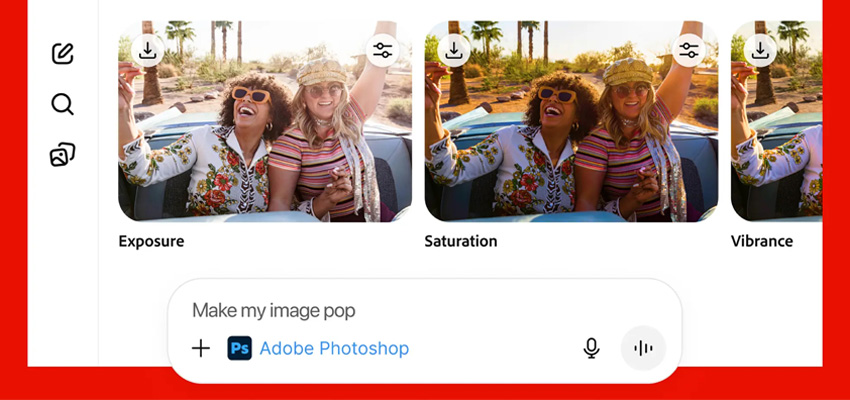
    PS for ChatGPT - Photos

    Create an amazing invitation with Adobe Express

    Create a party invite that’s as fun as your event. With Adobe Express in ChatGPT, you can design a stunning invitation in no time. Just tell ChatGPT what you’re looking for — like a festive theme or a sparkly design — and it’ll help you create the perfect invitation. Add your party details, choose the right imagery, and you’re all set to wow your guests.

    1. Click on the + icon, select More to view the available apps and choose Adobe Express.
    2. Type in a prompt like “Help me create an invitation for my dance party”.
    3. Choose a design that fits your vibe.
    4. Ask to update the copy to match your event.
    5. Ask to replace the image or add a background to create the look you want.
    PS for ChatGPT - Adobe Express

    Update your resume for your next big job hunt

    When you’re looking for a new professional challenge, you want to put your best foot forward. Adobe Acrobat in ChatGPT can help you create a curated job application package — resume, cover letter, references, portfolio — all in one PDF, for free. Here’s how:

    1. Upload your resume, cover letter, and references to ChatGPT.
    2. Click on the + icon, select More to view the available apps and choose Adobe Acrobat.
    3. Enter your prompt: “combine my documents into a single file”.
    4. Then ask to edit your cover letter, adapting it to each company you’re applying to. Just highlight the text, choose “Edit or format text,” and a sidebar opens for easy editing and formatting.
    PS for ChatGPT - Resumes

    Prompting tips and tricks

    To get the best possible results when creating with conversational interfaces, experiment with different prompt language. Here are some tips and tricks:

    • Be specific, explicit, clear and descriptive.
    • Describe what not to do if the results include something you do not want.
    • Add additional details to encourage the results you want.
    • Instead of asking for everything you want in one prompt, try focusing on separate details one-by-one in individual prompts. That way, you can focus first on getting the look you want, then concentrate on the text, then other details.

    Work smarter and faster in Photoshop

    Contact the Dax Data team today and find out more about the ultimate image editing and design application.

    Adobe Acrobat DC, Adobe Express, Adobe Photoshop

    Related Post

    • Better Value, Smarter Creativity: Introducing Creative Cloud Standard for Teams

      By editor | Comments are Closed

      Dax Data is excited to announce the availability of Creative Cloud Standard for Teams from the 2nd of March 2026 in South Africa, Kenya, Tanzania, Mauritius and Ghana. This solution is available to NEW Adobe Creative CloudRead more

    • New Photoshop Innovations Deliver Unmatched Control, Realism and Precision

      By editor | Comments are Closed

      If you’re a creative professional, you move fast, chasing an idea from first spark to final pixel, and the smallest amount of friction can slow your creative output. Whether you’re compositing multiple elements into aRead more

    • Adobe Premiere 25.6: Smarter Search, Speedier Edits and Effortless Collaboration

      By editor | Comments are Closed

      The newest version of Adobe Premiere brings next-level intelligence, speed, and collaboration to every part of your video workflow. Whether you’re cutting on your desktop or on the go, Premiere now brings a family of toolsRead more

    • 11 New ways to accelerate your design journey with Adobe Creative Cloud

      By editor | Comments are Closed

      If you make creative content for a living, your work has never been more valuable. Everyone recognises that creativity drives business growth, meaning that the people you work with often want lots of content onRead more

    • Boost Your Team’s Efficiency for Less: Dax Data’s Unmissable Black Friday Deal

      By editor | Comments are Closed

      Black Friday is here — and so is your chance to supercharge your productivity with Adobe Creative Cloud Pro for Teams. Starting 13 November 2025, NEW Adobe Creative Cloud customers can save up to 50%Read more

    Recent Posts

    • 1 March, 2026
      Comments Off on Adobe Connect Introduces New Features to Enhance Virtual Experiences

      Adobe Connect Introduces New Features to Enhance Virtual Experiences

    • 1 March, 2026
      Comments Off on Better Value, Smarter Creativity: Introducing Creative Cloud Standard for Teams

      Better Value, Smarter Creativity: Introducing Creative Cloud Standard for Teams

    • 1 March, 2026
      Comments Off on New Photoshop Innovations Deliver Unmatched Control, Realism and Precision

      New Photoshop Innovations Deliver Unmatched Control, Realism and Precision

    • 1 February, 2026
      Comments Off on Smarter Upgrades, Bigger Savings with Adobe Acrobat Studio

      Smarter Upgrades, Bigger Savings with Adobe Acrobat Studio

    Tags

    Acrobat DC Adobe Adobe Acrobat DC Adobe Acrobat Sign Adobe After Effects Adobe Captivate Adobe Captivate Prime Adobe Connect Adobe Creative Cloud Adobe Express Adobe Firefly Adobe Illustrator Adobe Photoshop Adobe Photoshop Lightroom Adobe Premiere Pro Adobe Sign Adobe Stock Adobe Substance 3D Android Apps Collaboration Creative Cloud CTIAF Devices digital transformation e-signatures eLearning iOS iPad Microsoft Mobile Newsletter Office365 Online Photography Photoshop Productivity Promo Promotion South Africa updates Virtual Platform Web conferencing Webinar Webinars

    Categories

    • Adobe
    • Adobe Acrobat Studio
    • Adobe Animate
    • Adobe Connect
    • Adobe Connect
    • Adobe Creative Cloud
    • Adobe Document Cloud
    • Adobe Photoshop
    • Adobe Photoshop Sketch
    • AppRiver
    • Collaboration
    • Compliance
    • Creative Cloud
    • Digital Imaging
    • Digital Publishing Suite
    • eLearning
    • Micro Focus
    • Microsoft
    • Newsletter
    • Office Productivity
    • Other
    • Photography
    • Security & Management
    • Tutorial
    • Uncategorized
    • Dax Data Logo
    •   Unit 1 Melomed Office Park
      Punters Way
      Kenilworth
      Cape Town
      7708
    •   +27 (0)21 683 3861
    •   0860 101 604
    •   sales@daxdata.co.za

    Useful Links

    • Creative Cloud
    • e-Learning
    • Document Cloud
    • Newsletter
    • Marketplace Login

    Recent Posts

    • Adobe Connect Introduces New Features to Enhance Virtual Experiences

      Adobe has recently rolled out one of the most significant updates to

      1 March, 2026
    • Better Value, Smarter Creativity: Introducing Creative Cloud Standard for Teams

      Dax Data is excited to announce the availability of Creative Cloud Standard for

      1 March, 2026
    Copyright © 2025 Dax Data. All Rights Reserved.  |  Privacy Policy
    • Home
    • Solutions
      • Creative Cloud
      • Adobe Express
      • Adobe Firefly
      • e-Learning
        • Adobe Captivate
        • Adobe Learning Manager
        • Adobe Connect
      • Document Cloud
        • Adobe Acrobat DC
        • Adobe Acrobat Sign
        • Adobe Acrobat AI Assistant
        • Adobe Acrobat Studio
      • Adobe Substance
    • Partners
    • News
      • Blog
      • Press Office
      • Newsletter
    • Support
    • About Us
    • Contact
    Dax Data