•   sales@daxdata.co.za
  • +27 (0)21 683 3861
  • Marketplace Login
  • “Adobe
Dax DataDax DataDax DataDax Data
  • Home
  • Solutions
    • Creative Cloud
    • Adobe Express
    • Adobe Firefly
    • e-Learning
      • Adobe Captivate
      • Adobe Learning Manager
      • Adobe Connect
    • Document Cloud
      • Adobe Acrobat DC
      • Adobe Acrobat Sign
      • Adobe Acrobat AI Assistant
      • Adobe Acrobat Studio
    • Adobe Substance
  • Partners
  • News
    • Blog
    • Press Office
    • Newsletter
  • Support
  • About Us
  • Contact

Revolutionise Photo Editing with Photoshop in ChatGPT

    Home Adobe Creative Cloud Revolutionise Photo Editing with Photoshop in ChatGPT

    Revolutionise Photo Editing with Photoshop in ChatGPT

    By editor | Adobe Creative Cloud | Comments are Closed | 1 February, 2026 | 0

    Adobe is empowering anyone to edit with Photoshop directly in ChatGPT, making this iconic creativity tool accessible for everyone. If you have an idea, you can use Photoshop for ChatGPT to make edits to photos, just by describing what you want in your own words.

    The combination of the world’s leading creative app and the world’s leading chat platform is a match made in creativity heaven, combining the power and precision of Photoshop with the ease and accessibility of ChatGPT’s conversational interface.

    But the benefits don’t stop with Photoshop. Adobe Acrobat and Adobe Express are also now available to the 800 million people who use ChatGPT each week. With these apps, you can easily bring Adobe magic to your photos, create stunning designs and edit your PDFs directly in ChatGPT — all for free.

    There are lots of ways to get started today. Photoshop your favourite family photo to make it picture-perfect for your holiday cards. Design that invitation to your New Year’s Eve party that will make it clear you’re the host with the most. Or get help with finding a new career by touching up your resume. All you need is an idea, ChatGPT and your favourite Adobe app.

    Step-by-step guide to use Adobe apps in ChatGPT

    Here’s how to get started creating with Adobe apps in ChatGPT:

    • Open ChatGPT and go to Settings > Apps & Connectors.
    • Browse to the Adobe app of your choice and select it.
    • Click on Connect and confirm the connection in the pop-up window.

    Once you’ve connected the app, just go to the ChatGPT prompt bar and follow these simple steps.

    • Click the + icon, then select More to view your enabled apps.
    • Choose the Adobe app you want to use.
    • Go!

    See specific examples of how to use each Adobe app in ChatGPT below:

    Simply use Photoshop with your favourite photos

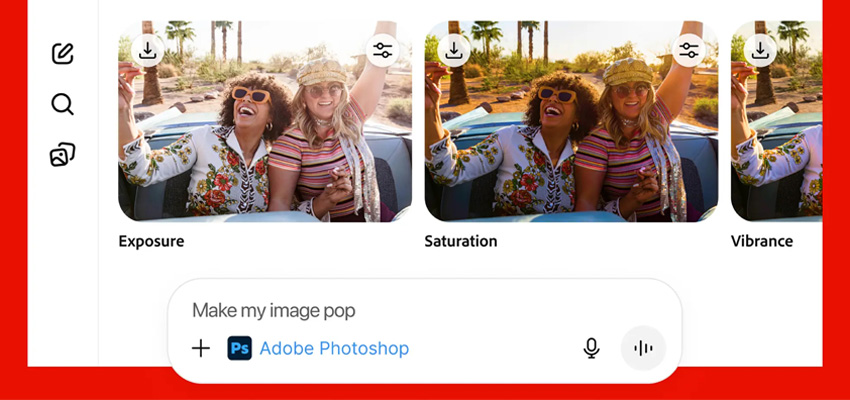
    With Adobe Photoshop for ChatGPT, you can easily enhance your images with just a few prompts. Ask ChatGPT to use Photoshop to make the people in your photo stand out, add an artistic effect to the background or a specific object in your image, or apply a grainy finish for a vintage vibe. It’s quick and fun to turn your travel snapshots into frame-worthy keepsakes — or add them to your holiday card.

    Try the following prompting steps:

    1. Upload the image you want to edit.
    2. Click on the + icon, select More to view the available apps and choose Adobe Photoshop.
    3. Type in the prompt “Make the people pop in my vacation photo”.
    4. Once that’s done, ask to add a retro effect selectively, only to the sky for example.
    5. Apply an artistic effect to the background.
    6. Apply a grain effect on the entire image.
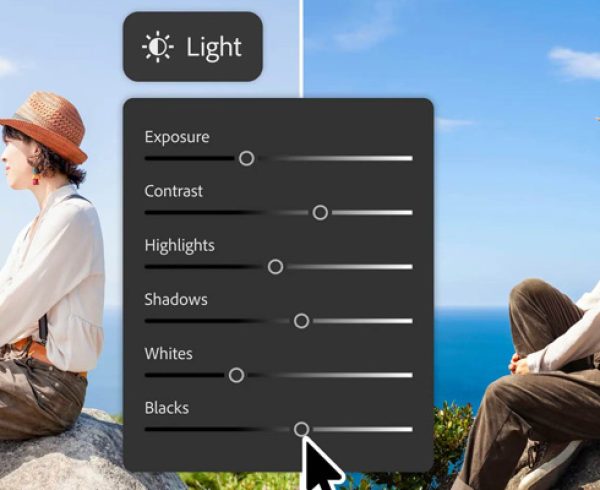
    7. After applying each adjustment or effect, click on your selection and fine-tune with sliders to make it uniquely yours.
    PS for ChatGPT - Photos

    Create an amazing invitation with Adobe Express

    Create a party invite that’s as fun as your event. With Adobe Express in ChatGPT, you can design a stunning invitation in no time. Just tell ChatGPT what you’re looking for — like a festive theme or a sparkly design — and it’ll help you create the perfect invitation. Add your party details, choose the right imagery, and you’re all set to wow your guests.

    1. Click on the + icon, select More to view the available apps and choose Adobe Express.
    2. Type in a prompt like “Help me create an invitation for my dance party”.
    3. Choose a design that fits your vibe.
    4. Ask to update the copy to match your event.
    5. Ask to replace the image or add a background to create the look you want.
    PS for ChatGPT - Adobe Express

    Update your resume for your next big job hunt

    When you’re looking for a new professional challenge, you want to put your best foot forward. Adobe Acrobat in ChatGPT can help you create a curated job application package — resume, cover letter, references, portfolio — all in one PDF, for free. Here’s how:

    1. Upload your resume, cover letter, and references to ChatGPT.
    2. Click on the + icon, select More to view the available apps and choose Adobe Acrobat.
    3. Enter your prompt: “combine my documents into a single file”.
    4. Then ask to edit your cover letter, adapting it to each company you’re applying to. Just highlight the text, choose “Edit or format text,” and a sidebar opens for easy editing and formatting.
    PS for ChatGPT - Resumes

    Prompting tips and tricks

    To get the best possible results when creating with conversational interfaces, experiment with different prompt language. Here are some tips and tricks:

    • Be specific, explicit, clear and descriptive.
    • Describe what not to do if the results include something you do not want.
    • Add additional details to encourage the results you want.
    • Instead of asking for everything you want in one prompt, try focusing on separate details one-by-one in individual prompts. That way, you can focus first on getting the look you want, then concentrate on the text, then other details.

    Work smarter and faster in Photoshop

    Contact the Dax Data team today and find out more about the ultimate image editing and design application.
    Adobe Acrobat DC, Adobe Express, Adobe Photoshop

    Related Post

    • Meet the New Adobe Firefly: Intelligent AI Agents and a More Powerful Creative Experience

      By editor | Comments are Closed

      Adobe has built Firefly as an all-in-one creative AI studio and they’re introducing new capabilities that remove even more of the friction between imagination and finished work. Firefly AI Assistant (beta), powered by Adobe’s creative agent, now includesRead more

    • New Creative Cloud Features Streamline Every Stage of the Creative Process

      By editor | Comments are Closed

      Have you ever spent hours manually reviewing thousands of photos from an event or portrait shoot to find the selects your clients will love? Redrawn a roto mask from scratch because the footage moved? TakenRead more

    • Big Creative Power for Small Teams: Creative Cloud Standard Now Available for Teams with 1-9 Users

      By editor | Comments are Closed

      Great news for small businesses, creative agencies, and growing teams: Adobe Creative Cloud Standard for Teams is now available to organisations requiring 1-9 seats, expanding eligibility beyond the previous 2-9 seat requirement. This makes itRead more

    • From Almost to Exact: Adobe Firefly’s Latest Image Editing Upgrades

      By editor | Comments are Closed

      If you’ve ever used AI to create an image and thought, “This is close, but not quite what I imagined”, then you’re going to love Precision Flow and AI Markup, two new powerful and intuitive editing tools in AdobeRead more

    • Adobe for creativity: a new way to create with Adobe, now in Claude

      By editor | Comments are Closed

      Creative ideas and work can take shape across many places, and Adobe wants you to be able to create with the best of their tools directly in the surfaces where you work. Adobe is excitedRead more

    Recent Posts

    • 1 July, 2026
      Comments Off on Meet the New Adobe Firefly: Intelligent AI Agents and a More Powerful Creative Experience

      Meet the New Adobe Firefly: Intelligent AI Agents and a More Powerful Creative Experience

    • 1 July, 2026
      Comments Off on New Creative Cloud Features Streamline Every Stage of the Creative Process

      New Creative Cloud Features Streamline Every Stage of the Creative Process

    • 1 July, 2026
      Comments Off on Big Creative Power for Small Teams: Creative Cloud Standard Now Available for Teams with 1-9 Users

      Big Creative Power for Small Teams: Creative Cloud Standard Now Available for Teams with 1-9 Users

    • 1 June, 2026
      Comments Off on From Almost to Exact: Adobe Firefly’s Latest Image Editing Upgrades

      From Almost to Exact: Adobe Firefly’s Latest Image Editing Upgrades

    Tags

    Acrobat DC Adobe Adobe Acrobat DC Adobe Acrobat Sign Adobe After Effects Adobe Captivate Adobe Captivate Prime Adobe Connect Adobe Creative Cloud Adobe Express Adobe Firefly Adobe Illustrator Adobe InDesign Adobe Photoshop Adobe Photoshop Lightroom Adobe Premiere Pro Adobe Sign Adobe Stock Adobe Substance 3D Adobe XD Android Collaboration Creative Cloud CTIAF Devices digital transformation e-signatures eLearning iOS iPad Microsoft Mobile Newsletter Online Photography Photoshop Productivity Promo Promotion South Africa updates Virtual Platform Web conferencing Webinar Webinars

    Categories

    • Adobe
    • Adobe Acrobat Studio
    • Adobe Animate
    • Adobe Connect
    • Adobe Connect
    • Adobe Creative Cloud
    • Adobe Document Cloud
    • Adobe Photoshop
    • Adobe Photoshop Sketch
    • AppRiver
    • Collaboration
    • Compliance
    • Creative Cloud
    • Digital Imaging
    • Digital Publishing Suite
    • eLearning
    • Micro Focus
    • Microsoft
    • Newsletter
    • Office Productivity
    • Other
    • Photography
    • Security & Management
    • Tutorial
    • Uncategorized
    • Dax Data Logo
    •   Unit 1 Melomed Office Park
      Punters Way
      Kenilworth
      Cape Town
      7708
    •   +27 (0)21 683 3861
    •   0860 101 604
    •   sales@daxdata.co.za

    Useful Links

    • Creative Cloud
    • e-Learning
    • Document Cloud
    • Newsletter
    • Marketplace Login

    Recent Posts

    • Meet the New Adobe Firefly: Intelligent AI Agents and a More Powerful Creative Experience

      Adobe has built Firefly as an all-in-one creative AI studio and they’re introducing new

      1 July, 2026
    • New Creative Cloud Features Streamline Every Stage of the Creative Process

      Have you ever spent hours manually reviewing thousands of photos from an

      1 July, 2026
    Copyright © 2025 Dax Data. All Rights Reserved.  |  Privacy Policy
    • Home
    • Solutions
      • Creative Cloud
      • Adobe Express
      • Adobe Firefly
      • e-Learning
        • Adobe Captivate
        • Adobe Learning Manager
        • Adobe Connect
      • Document Cloud
        • Adobe Acrobat DC
        • Adobe Acrobat Sign
        • Adobe Acrobat AI Assistant
        • Adobe Acrobat Studio
      • Adobe Substance
    • Partners
    • News
      • Blog
      • Press Office
      • Newsletter
    • Support
    • About Us
    • Contact
    Dax Data