•   sales@daxdata.co.za
  • +27 (0)21 683 3861
  • Marketplace Login
  • “Adobe
Dax DataDax DataDax DataDax Data
  • Home
  • Solutions
    • Creative Cloud
    • Adobe Express
    • Adobe Firefly
    • e-Learning
      • Adobe Captivate
      • Adobe Learning Manager
      • Adobe Connect
    • Document Cloud
      • Adobe Acrobat DC
      • Adobe Acrobat Sign
      • Adobe Acrobat AI Assistant
      • Adobe Acrobat Studio
    • Adobe Substance
  • Partners
  • News
    • Blog
    • Press Office
    • Newsletter
  • Support
  • About Us
  • Contact

Supercharge your creative workflows with the latest updates in Adobe Photoshop

    Home Adobe Creative Cloud Supercharge your creative workflows with the latest updates in Adobe Photoshop

    Supercharge your creative workflows with the latest updates in Adobe Photoshop

    By editor | Adobe Creative Cloud | Comments are Closed | 1 August, 2024 | 0

    Adobe is thrilled to unveil Photoshop’s latest update, packed with new innovations to supercharge your core creative workflows. Inspired by valuable feedback from Adobe’s creative community, these additions will boost your productivity and precision in image selection, compositing, adjustments, and typography all in the Photoshop desktop app and Photoshop on the web.

    Selection Brush Tool

    You can now easily select an area with the new Selection Brush Tool by simply brushing over it. Adjust brush settings for opacity and hardness to create selections with varying opacity and feathered edges, allowing for a more seamless and nuanced effect.

    The Selection Brush Tool provides more ease and flexibility when you are selecting, compositing, and applying Filters or Fills:

    • Quickly and intuitively select areas using a brush without having to go into Quick Mask mode. In Quick Mask mode, accessible by pressing “Q,” you can use the brush, eraser, and colour overlay to paint areas you want to preserve or remove from an image, adjusting opacity as needed. This requires extra steps, including entering and exiting Quick Mask mode. If you are not familiar with Photoshop, this can be tricky to understand and use, which makes the Selection Brush Tool a faster and more user-friendly alternative for making quick selections.
    • After brushing on a selection and adjusting brush settings, you can seamlessly apply Fills or Filters to create a desired effect. For example, you can create a realistic depth of field effect in a few seconds by making a feathered selection, inverting it, and then applying a Gaussian Blur filter to the selected background area:
    Cat in a field of flowers 1

    Starting image of cat in a field of flowers.

    Cat in a field of flowers 2

    Opaque and feathered selection applied to cat using Selection Brush Tool (93 percent Opacity, 0 percent Hardness)

    Cat in a field of flowers 3

    Selection is inverted to select the background behind the cat.

    Cat in a field of flowers 4

    Gaussian Blur Filter applied to the inverted selection area in the background to create a depth of field effect with the cat as the focal point.

    • Unlock more flexibility when compositing with opaque or feathered selections that blend more seamlessly with new images.

    Adjustment Brush Tool

    • You can now adjust a specific part of your image in a single step with the new Adjustment Brush Tool, now out of beta. Paint on adjustments to brightness, saturation, exposure, and more – and then fine-tune the adjustment values for the exact look you want.

    Text to Image, powered by Adobe Firefly Image 3 Model

    Adobe has also introduced the new Text to Image feature, now out of beta and called Generate Image in the Photoshop app and Photoshop on the web. Powered by the latest Adobe Firefly Image 3 Model, this feature helps you ideate and streamline repetitive tasks directly in Photoshop. Generate dozens of ideas in minutes, jumpstart asset creation, and achieve complex, custom outputs more efficiently. Simply type in a text prompt and watch your ideas come to life in seconds.

    If you have a specific style in mind, you can upload a Reference Image to control and guide the Text to Image feature to achieve a desired look. You can also have more control over your generated output by adjusting settings like Content Type (i.e., photo or art) and Style Effects (e.g., Movements, Themes, Techniques, Effects, Materials, Concepts). Then, use Photoshop’s comprehensive set of tools and compositing capabilities to create the exact images you imagine.

    Adobe’s approach to Generative AI

    As shared previously, Firefly is designed to be commercially safe with a creator-first approach to generative AI and only trains on licensed content, such as Adobe Stock, and public domain content where copyright has expired. To maintain transparency in AI usage within Adobe’s applications, Firefly-powered features in Photoshop automatically attach Content Credentials to images with generated content. Like a nutrition label for digital content, Content Credentials are tamper-evident metadata that provide more information about the content, including whether AI was used in the creation or editing process.

    This means you can create confidently and feel at ease while using any Firefly-powered generative AI features in Photoshop, knowing that Firefly was built to serve as a creative companion that accelerates tedious tasks and enhances the work you are already doing.

    Bullets and numbering support for the Type Tool

    When using the Type Tool, you can now create bulleted and numbered lists in Photoshop with a single click, saving you from repetitive manual formatting.

    Photoshop updates

    Improved Contextual Task Bar (for Shapes and Transform workflows)

    The improved Contextual Task Bar now includes popular settings for working with Shapes or Transforming and rotating objects, so you can avoid menu-diving and work more efficiently.

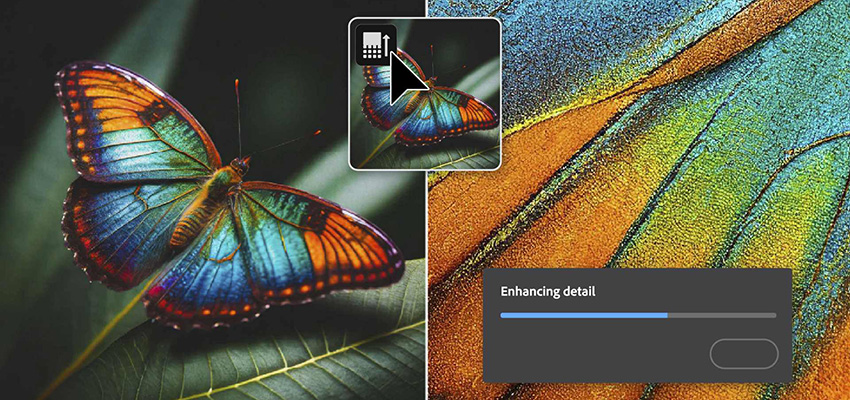
    Enhance Detail for Generative Fill

    Lastly, the new Enhance Detail improvement for Generative Fill variations enables you to produce generative results with greater sharpness and detail.

    Try out the new features today

    These updates and capabilities are mutually reinforcing, enabling you to create with more intentionality, iterate with greater efficiency, and bring your vision to life with higher accuracy, details, and realism. Access the new features in the Photoshop app and Photoshop on the web today.

    Explore quick new ways to edit images and text in your projects in Adobe Photoshop. Contact Dax Data for more information on pricing and licensing options.


    Adobe Firefly, Adobe Photoshop, Adobe Stock

    Related Post

    • Better Value, Smarter Creativity: Introducing Creative Cloud Standard for Teams

      By editor | Comments are Closed

      Dax Data is excited to announce the availability of Creative Cloud Standard for Teams from the 2nd of March 2026 in South Africa, Kenya, Tanzania, Mauritius and Ghana. This solution is available to NEW Adobe Creative CloudRead more

    • New Photoshop Innovations Deliver Unmatched Control, Realism and Precision

      By editor | Comments are Closed

      If you’re a creative professional, you move fast, chasing an idea from first spark to final pixel, and the smallest amount of friction can slow your creative output. Whether you’re compositing multiple elements into aRead more

    • Revolutionise Photo Editing with Photoshop in ChatGPT

      By editor | Comments are Closed

      Adobe is empowering anyone to edit with Photoshop directly in ChatGPT, making this iconic creativity tool accessible for everyone. If you have an idea, you can use Photoshop for ChatGPT to make edits to photos,Read more

    • Adobe Premiere 25.6: Smarter Search, Speedier Edits and Effortless Collaboration

      By editor | Comments are Closed

      The newest version of Adobe Premiere brings next-level intelligence, speed, and collaboration to every part of your video workflow. Whether you’re cutting on your desktop or on the go, Premiere now brings a family of toolsRead more

    • 11 New ways to accelerate your design journey with Adobe Creative Cloud

      By editor | Comments are Closed

      If you make creative content for a living, your work has never been more valuable. Everyone recognises that creativity drives business growth, meaning that the people you work with often want lots of content onRead more

    Recent Posts

    • 1 March, 2026
      Comments Off on Adobe Connect Introduces New Features to Enhance Virtual Experiences

      Adobe Connect Introduces New Features to Enhance Virtual Experiences

    • 1 March, 2026
      Comments Off on Better Value, Smarter Creativity: Introducing Creative Cloud Standard for Teams

      Better Value, Smarter Creativity: Introducing Creative Cloud Standard for Teams

    • 1 March, 2026
      Comments Off on New Photoshop Innovations Deliver Unmatched Control, Realism and Precision

      New Photoshop Innovations Deliver Unmatched Control, Realism and Precision

    • 1 March, 2026
      Comments Off on March 2026 – Newsletter

      March 2026 – Newsletter

    Tags

    Acrobat DC Adobe Adobe Acrobat DC Adobe Acrobat Sign Adobe After Effects Adobe Captivate Adobe Captivate Prime Adobe Connect Adobe Creative Cloud Adobe Express Adobe Firefly Adobe Illustrator Adobe Photoshop Adobe Photoshop Lightroom Adobe Premiere Pro Adobe Sign Adobe Stock Adobe Substance 3D Android Apps Collaboration Creative Cloud CTIAF Devices digital transformation e-signatures eLearning iOS iPad Microsoft Mobile Newsletter Office365 Online Photography Photoshop Productivity Promo Promotion South Africa updates Virtual Platform Web conferencing Webinar Webinars

    Categories

    • Adobe
    • Adobe Acrobat Studio
    • Adobe Animate
    • Adobe Connect
    • Adobe Connect
    • Adobe Creative Cloud
    • Adobe Document Cloud
    • Adobe Photoshop
    • Adobe Photoshop Sketch
    • AppRiver
    • Collaboration
    • Compliance
    • Creative Cloud
    • Digital Imaging
    • Digital Publishing Suite
    • eLearning
    • Micro Focus
    • Microsoft
    • Newsletter
    • Office Productivity
    • Other
    • Photography
    • Security & Management
    • Tutorial
    • Uncategorized
    • Dax Data Logo
    •   Unit 1 Melomed Office Park
      Punters Way
      Kenilworth
      Cape Town
      7708
    •   +27 (0)21 683 3861
    •   0860 101 604
    •   sales@daxdata.co.za

    Useful Links

    • Creative Cloud
    • e-Learning
    • Document Cloud
    • Newsletter
    • Marketplace Login

    Recent Posts

    • Adobe Connect Introduces New Features to Enhance Virtual Experiences

      Adobe has recently rolled out one of the most significant updates to

      1 March, 2026
    • Better Value, Smarter Creativity: Introducing Creative Cloud Standard for Teams

      Dax Data is excited to announce the availability of Creative Cloud Standard for

      1 March, 2026
    Copyright © 2025 Dax Data. All Rights Reserved.  |  Privacy Policy
    • Home
    • Solutions
      • Creative Cloud
      • Adobe Express
      • Adobe Firefly
      • e-Learning
        • Adobe Captivate
        • Adobe Learning Manager
        • Adobe Connect
      • Document Cloud
        • Adobe Acrobat DC
        • Adobe Acrobat Sign
        • Adobe Acrobat AI Assistant
        • Adobe Acrobat Studio
      • Adobe Substance
    • Partners
    • News
      • Blog
      • Press Office
      • Newsletter
    • Support
    • About Us
    • Contact
    Dax Data